




High school gym lobbies have long served as showcases for athletic excellence, with traditional trophy cases displaying decades of championships, records, and team accomplishments. However, successful athletic programs face an inevitable problem: trophy cases fill up, wall space runs out, and new achievements have nowhere to go. The result is storage rooms filled with trophies that students never see and a growing frustration among coaches and athletic directors who want every team recognized appropriately.
Whether you’re an athletic director running out of trophy display space, a facilities manager planning gym renovations, or a principal exploring modern recognition options, this guide provides data-driven insights and practical implementation strategies for touchscreen display solutions.
The Trophy Overcrowding Problem: Why Traditional Cases No Longer Work
Before examining touchscreen solutions, it’s important to understand why trophy overcrowding has become such a widespread problem in high school athletic facilities.
The Inevitable Space Constraint
Traditional trophy cases operate under a fundamental limitation: they provide fixed, finite display space. A typical trophy case measures 6-8 feet wide, 6-7 feet tall, and holds approximately 40-60 trophies depending on size. Most high schools have 3-6 trophy cases in their gym lobby, providing space for 120-360 trophies total.

Consider a typical high school athletic program:
- 15-20 varsity sports (boys and girls combined)
- 3-5 achievements per sport annually (conference championships, regional titles, state qualifiers, individual records)
- 50-100 new trophies and plaques added each year
- 30+ years of program history worth preserving
This arithmetic leads to an inescapable conclusion: within 3-5 years, every available display space fills completely. Schools then face difficult choices about which achievements to remove, which trophies to store, and how to honor new accomplishments without displacing older ones.
The Hidden Cost of Storage
When trophy cases fill beyond capacity, the overflow typically ends up in storage—athletic offices, basement storage rooms, or even custodial closets. A 2024 survey of 250 high school athletic directors found that the average program has approximately 200-300 trophies in storage that are never displayed publicly.
This storage approach creates multiple problems:
Missed Recognition Opportunities: Athletes who earned these achievements never receive public acknowledgment. Their accomplishments remain invisible to current students, parents, and visitors.
Deterioration and Damage: Storage conditions often accelerate trophy deterioration. Trophies tarnish, plaques fade, and physical damage occurs when items are stacked or moved repeatedly.
Lost Institutional Memory: Without public visibility, the context and stories behind achievements fade. Within 10-15 years, even athletic department staff may not remember what specific trophies represented or which athletes earned them.
Inequitable Recognition: Newer achievements displace older ones, creating a system where recent teams receive recognition while historical accomplishments disappear from view. This undermines the continuity of program tradition.
The Renovation Dilemma
Some schools attempt to solve space limitations through facility renovations—adding more trophy cases or creating dedicated hall of fame spaces. However, this approach presents significant challenges:
High Capital Costs: Custom trophy cases cost $3,000-$8,000 per unit. Adding 3-4 additional cases represents a $10,000-$30,000 investment that only delays the inevitable space problem.
Limited Wall Space: Gym lobbies have finite wall space. HVAC systems, doorways, electrical panels, fire safety equipment, and accessibility requirements all compete for the same walls where trophy cases could mount.
Maintenance Burden: Each additional trophy case adds to the cleaning, maintenance, and update workload. Cases require regular glass cleaning, lighting replacement, and physical rearrangement as new trophies are added.
Temporary Solution: Additional cases simply push the problem forward by 3-5 years. Successful programs will eventually fill new display space, returning to the same overcrowding challenges.
How Touchscreen Displays Solve Trophy Overcrowding
Interactive touchscreen technology fundamentally changes the space equation by converting physical display limitations into digital capacity that is essentially unlimited.
Unlimited Achievement Capacity
A single 55-inch touchscreen display can showcase thousands of trophies, championships, individual achievements, and historical moments that would require 30-50 traditional trophy cases to display physically. This capacity eliminates the need to choose between recognizing new achievements and preserving historical ones.
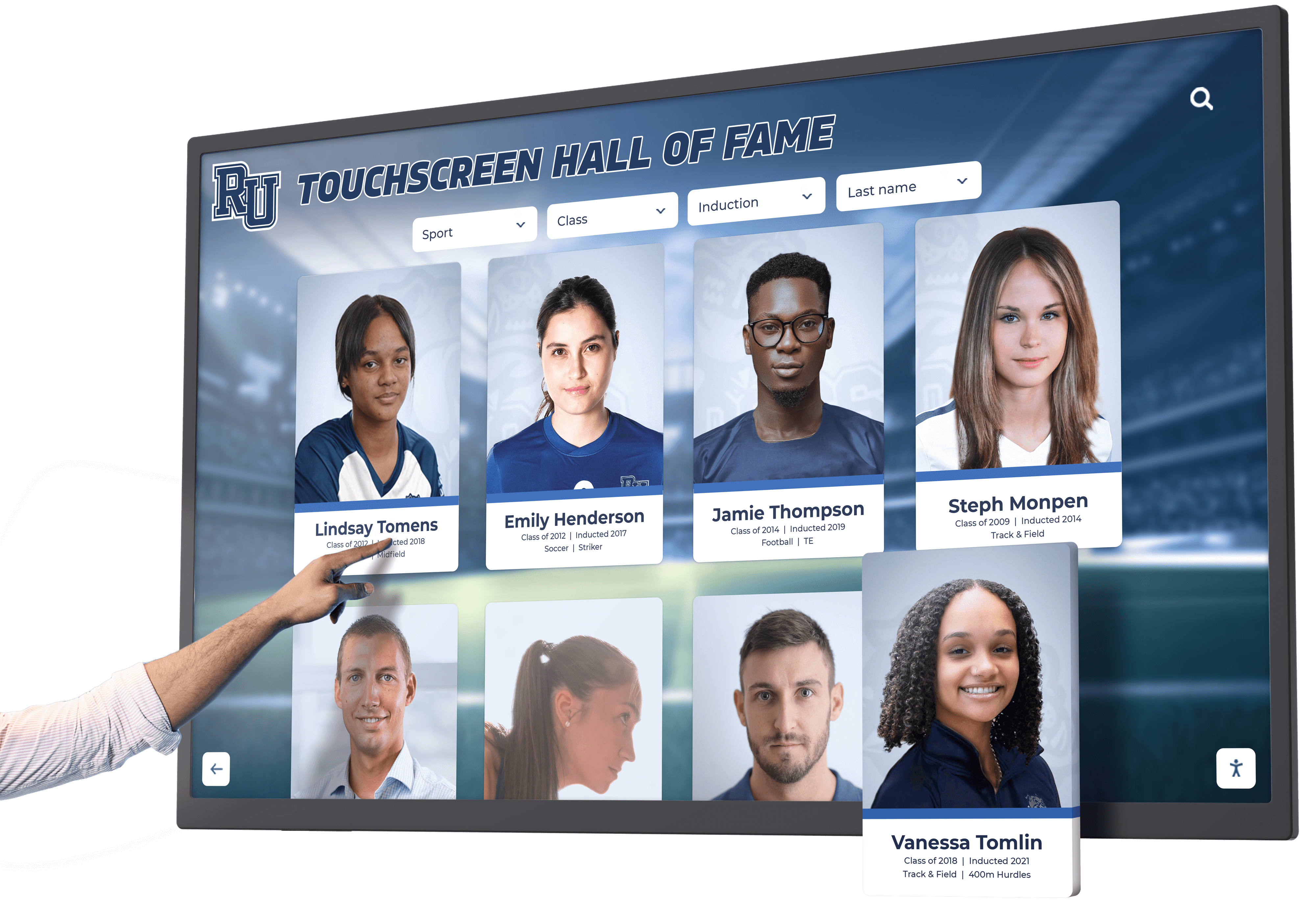
Comprehensive Recognition Capability: A digital system enables schools to document and display:
- Every championship trophy across all sports and eras
- Individual athlete awards and record-breaking performances
- Team photos with complete rosters for every season
- Coaching milestones and career achievements
- Historical photos documenting program evolution
- Retired jerseys and hall of fame inductees
- Academic all-conference recognitions
- Tournament brackets and playoff runs
This comprehensive approach ensures no achievement goes unrecognized due to space constraints. Last season’s state championship and championships from 30 years ago both receive appropriate visibility within the digital system.
Minimal Physical Footprint
While traditional trophy cases require 6-8 feet of wall space per unit, a touchscreen display typically measures just 48-65 inches diagonally (4-5.5 feet) and can be mounted on nearly any wall or installed as a freestanding kiosk. This space efficiency provides several advantages:
Flexible Installation Locations: Touchscreens can mount in locations unsuitable for traditional trophy cases—narrow hallway sections, beside doorways, or in corners where full-depth cases wouldn’t fit.
Preserved Floor Space: Wall-mounted displays don’t extend into traffic areas, maintaining open circulation space in gym lobbies. This is particularly valuable in facilities where building codes require minimum corridor widths.
Aesthetic Integration: Modern touchscreen displays complement contemporary facility design without the institutional appearance of traditional glass trophy cases. They align with the digital technology students encounter throughout their educational experience.
Enhanced Storytelling Through Multimedia
Physical trophies communicate limited information—typically just what’s engraved on the hardware itself. Digital trophy displays expand these narratives through multiple media formats that provide context and emotional connection.
Photo Galleries: High-resolution images document trophies from multiple angles while team photos place championships in human context. Action shots from games demonstrate the athletic excellence that trophies represent, and celebration photos capture emotional moments that make victories memorable.
Video Integration: Championship game highlights bring trophies to life through actual footage of title-winning performances. Coach interviews provide insider perspectives on what made specific seasons or athletes special. These video elements particularly engage younger students who connect more readily with visual media than static displays.
Detailed Narratives: Digital platforms accommodate written content impossible to include on physical trophy labels. Schools can include:
- Season summaries describing team development and key victories
- Statistics showcasing individual and team performance metrics
- Competition context explaining championship significance
- Coaching philosophies and strategies that led to success
- Alumni updates tracking athlete careers beyond high school
- Historical comparisons placing achievements within program traditions
Touchscreen Display Technology for Gym Lobby Applications
Understanding the technology components helps athletic directors and administrators make informed decisions about touchscreen display implementations.
Display Hardware Specifications
Screen Size Selection: For gym lobby installations, screen size should match the viewing distance and space characteristics:
- 55-65 inches: Most common size for gym lobby installations; comfortable viewing from 10-15 feet; suitable for areas where visitors typically stand while interacting
- 70-86 inches: Appropriate for larger lobbies or locations where the display serves as a focal point; visible from 15-20+ feet; creates impressive presence for visitors
- 43-50 inches: Suitable for supplementary displays in smaller alcoves or secondary locations; good for intimate viewing at 6-10 feet
A practical guideline: screen size in inches should equal approximately one-third of the primary viewing distance in feet. For a typical gym lobby where visitors might view the display from 12-15 feet, a 55-65 inch screen provides optimal visibility.

Touchscreen Technology Options:
Modern commercial touchscreens use two primary technologies:
Capacitive Touchscreens: Respond to light touch from fingers similar to smartphones. These displays support multi-touch gestures, provide responsive precise input, and deliver the most sophisticated user experience. The drawback is higher cost, particularly at larger screen sizes.
Infrared (IR) Touchscreens: Use infrared sensors detecting any object breaking the beam. These work with fingers, gloves, or stylus; support multi-touch; and cost substantially less than capacitive technology at sizes above 50 inches. Response time is slightly slower than capacitive but still suitable for interactive kiosk applications.
For gym lobby trophy displays, infrared technology typically provides the best value—it offers sufficient responsiveness for browsing achievements while costing 30-40% less than capacitive alternatives at larger screen sizes.
Commercial vs. Consumer Displays:
Always specify commercial-grade displays rather than consumer televisions:
- Commercial displays are rated for 16-24 hour daily operation versus 4-8 hours for consumer TVs
- Commercial warranties cover business use; consumer warranties may be voided by continuous operation
- Commercial displays offer higher brightness (500-700 nits) suitable for well-lit gym lobbies versus 300-400 nits for consumer TVs
- Commercial units provide better thermal management for vertical orientation and extended use
- Serviceability and mounting options are designed for professional installations
The price premium for commercial displays typically ranges from 30-50% over consumer equivalents, but the reliability, warranty coverage, and appropriate feature set justify the investment for high-traffic public installations.
Computing and Software Platform
The computer powering your touchscreen processes content and manages user interaction. Minimum specifications for smooth operation include:
- Processor: Intel i5 (8th generation or newer) or AMD Ryzen 5 equivalent
- RAM: 8GB minimum, 16GB recommended for video-heavy content
- Storage: 256GB SSD for fast boot times; increase capacity for extensive local video libraries
- Graphics: Integrated graphics sufficient for most applications; dedicated GPU beneficial for 4K video playback
Software Platform Options:
Schools can choose from several software approaches:
Purpose-Built Recognition Software: Specialized platforms designed specifically for showcasing achievements include pre-designed templates, intuitive content management, built-in search functionality, and automatic slideshow modes. Solutions like Rocket Alumni Solutions provide cloud-based management, professional templates, and technical support from recognition display specialists.
Digital Signage Platforms: Commercial digital signage software can be adapted for interactive use. These offer mature features and multi-display management but typically weren’t optimized for touchscreen interaction and may require customization.
Custom Web Applications: Technology-proficient schools might build custom solutions using HTML, CSS, and JavaScript. This provides complete control and avoids subscription fees but requires development expertise and ongoing maintenance responsibility.
Installation Considerations for Gym Lobbies
Gym lobby environments present specific considerations affecting touchscreen display installation:
Environmental Factors:
Lighting Conditions: Gym lobbies typically feature abundant natural light from windows and high-intensity overhead lighting. Displays must provide sufficient brightness (minimum 500 nits, preferably 600-700 nits) to remain readable in these conditions. Avoid mounting displays where direct sunlight hits the screen during parts of the day, as even high-brightness commercial displays struggle with direct sun exposure.
Temperature and Humidity: Gym facilities experience temperature fluctuations as exterior doors open frequently and HVAC systems cycle. Displays should operate reliably in temperature ranges of 60-85°F. In regions with extreme temperatures, consider climate-controlled installation locations or displays with wider operating temperature ranges.
Acoustic Environment: Gym lobbies can be noisy during events and passing periods. If the display includes audio content, external speakers may be necessary to provide adequate volume. Alternatively, headphone jacks allow individual audio access without contributing to ambient noise.
Physical Location Selection:
High-Traffic Visibility: Position displays where they receive natural attention from arriving visitors, students passing between classes, and families attending games. Common optimal locations include directly across from main gym entrance doors, beside ticket/concession areas, and along primary circulation paths connecting gym to school main building.
Wall Structure: Verify walls can support mounting hardware weight. Concrete or concrete block walls (common in gym construction) require appropriate masonry anchors. Metal stud walls need backing reinforcement. Load-bearing requirements typically range from 75-150 pounds for commercial displays including mounting hardware.
Accessibility Compliance: ADA guidelines require that operable components of interactive displays be reachable by wheelchair users. Mount touchscreens with the center of the screen at 48-54 inches from the floor and ensure 30x48 inches of clear floor space in front of the display for wheelchair maneuvering. Touch-sensitive areas should fall within the 15-48 inch height range for forward approach.
Security Considerations: While gym lobbies typically have good visibility reducing vandalism risk, consider locations with supervision during high-traffic periods. Some schools install displays in areas visible from athletic office windows or near staffed areas. For particularly vulnerable locations, lockable kiosk enclosures provide physical protection for display hardware.
Planning Your Gym Lobby Touchscreen Implementation
Successful touchscreen display projects follow systematic planning addressing objectives, content strategy, budget, and stakeholder engagement.
Defining Implementation Objectives
Start by clarifying what you want your gym lobby touchscreen to accomplish:
Primary Recognition Goals:
- Provide comprehensive visibility for all athletic achievements across all sports
- Preserve and showcase program history spanning decades
- Create equitable recognition regardless of sport, gender, or era
- Solve trophy storage problems by digitally documenting everything
- Inspire current athletes through historical examples of excellence
Engagement Goals:
- Create interactive experiences visitors actually use rather than passively view
- Enable alumni to easily find their own achievements and team photos
- Provide searchable access to specific teams, years, or athletes
- Generate social media sharing and community engagement
- Strengthen connection to school athletic traditions
Operational Goals:
- Simplify the process of adding new achievements throughout the year
- Reduce maintenance burden compared to traditional trophy cases
- Create sustainable system requiring minimal staff time and expertise
- Create sustainable system that can expand as program needs grow
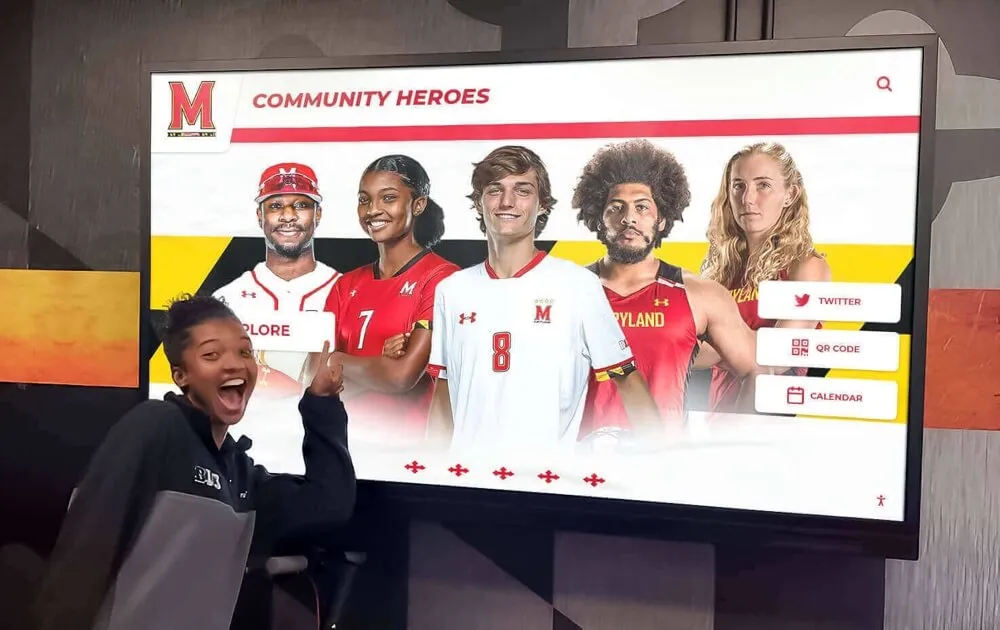
Clear objectives guide subsequent decisions about technology selection, content priorities, and implementation approaches.
Content Development Strategy
Quality content determines whether touchscreen displays succeed or disappoint. Poor content execution undermines even excellent hardware investments.
Phase 1: Trophy and Achievement Inventory
Begin by comprehensively documenting what exists:
- Photograph all trophies currently in display cases
- Photograph all trophies and plaques in storage areas, athletic offices, and coaching spaces
- Review athletic department files for team photos, rosters, and historical records
- Search yearbook archives for sports coverage and team photos
- Contact alumni associations for historical materials they may have preserved
- Interview long-tenured coaches and staff about program history
This inventory typically reveals far more content than initially expected. One Missouri high school discovered over 400 trophies in storage when implementing a digital system—achievements earned over 35 years that current students had never seen.
Phase 2: Digitization and Organization
Convert physical materials into digital formats:
Photography Standards:
- High-resolution images (minimum 1920x1080, preferably 3840x2160 for 4K displays)
- Consistent neutral backgrounds (white or light gray) that don’t distract from trophies
- Good lighting showing trophy details and engraving clearly
- Multiple angles when helpful for showing trophy design
Organizational Framework: Structure content for intuitive navigation:
- Primary organization by sport (aligns with how most visitors think about athletics)
- Secondary organization by year or decade (supports chronological browsing)
- Achievement type categories (conference championships, state titles, individual records)
- Searchable metadata including athlete names, coach names, years, and keywords
Phase 3: Enhanced Storytelling Content
Go beyond basic trophy photos to create engaging narratives:
- Write descriptions providing context about championships (how the team won, what made the season special, significant obstacles overcome)
- Gather team photos showing all athletes who contributed to achievements
- Collect action photos from games and competitions
- Source video highlights from championship games or record-breaking performances
- Include statistics and records documenting historical significance
- Add coach spotlights explaining program philosophies and traditions
This enhanced content transforms simple trophy documentation into stories that connect emotionally with viewers and provide educational context for current students.
Phase 4: Ongoing Update Workflow
Establish systems ensuring the display remains current:
Immediate Updates: Add new championships and records within 24-48 hours of achievement. This responsiveness demonstrates that digital recognition provides timely acknowledgment.
Seasonal Updates: At the conclusion of each sport season, add comprehensive season summaries, complete team photos with rosters, and final statistics.
Annual Reviews: Schedule annual content audits ensuring accuracy, updating athlete alumni information, and refreshing featured content selections.
Community Contributions: Create submission forms allowing alumni to contribute historical photos and memories, enriching official content with community knowledge.
Budget Planning and Funding
Touchscreen display implementations require upfront investment, but comprehensive cost analysis often reveals favorable economics compared to traditional alternatives.
Initial Investment Components:
Hardware Costs:
- Commercial touchscreen display (55-65 inch): $3,500-$6,000
- Mounting hardware (wall mount or kiosk enclosure): $400-$2,500
- Computer (mini-PC form factor): $500-$800
- Cabling and installation materials: $200-$500
- Professional installation labor: $800-$2,000
Total hardware investment: $5,400-$11,800 for single display installation
Software and Content Development:
- Recognition software licensing: $1,500-$5,000 annually
- Initial content development (photography, digitization, data entry): $2,000-$6,000
- Training and onboarding: Often included with software licensing
First-year software and content costs: $3,500-$11,000
Total first-year investment: $9,000-$23,000 for a comprehensive single-display implementation
Ongoing Annual Costs:
- Software licensing and support: $1,500-$5,000
- Content updates: Primarily staff time (typically 2-4 hours monthly)
- Electricity: $40-$70 annually (at 12 hours daily operation)
- Maintenance: Minimal beyond periodic screen cleaning
Annual operational costs: $1,600-$5,500
Comparative Cost Analysis:
Traditional trophy case approaches also involve substantial costs:
- New trophy cases: $3,000-$8,000 per unit
- Installation: $500-$1,500 per case
- Physical trophies and plaques: $50-$300 per item
- Ongoing cleaning and maintenance: Staff time
- Periodic case modifications: $200-$500 per update
A program adding 3-4 new trophy cases over 10 years invests $12,000-$35,000 in physical infrastructure that still doesn’t solve capacity problems or provide digital capabilities. When accounting for eliminated future trophy case purchases, reduced physical trophy production, and decreased maintenance time, touchscreen displays often prove cost-competitive over 8-10 year timeframes while providing vastly superior recognition capacity.
Funding Sources:
Schools successfully fund touchscreen implementations through:
- Athletic department budgets reallocating funds previously spent on physical trophy cases and plaques
- Booster club fundraising specifically designated for recognition upgrades
- Alumni association donations supporting school legacy preservation
- Facility improvement bonds during gym renovations
- Corporate sponsorships where appropriate and allowed by district policy
- Grant applications through education foundations or local community organizations
Many schools implement phased approaches—starting with a single display in the gym lobby and adding supplementary displays in subsequent years as budget allows.
Real-World Implementation: Case Study Insights
Examining how actual high schools have implemented gym lobby touchscreen displays provides practical insights.
Space Reclamation Results
Schools transitioning from traditional trophy cases to digital displays consistently report significant space benefits. A typical scenario:
Before: Six trophy cases lining gym lobby walls, all filled beyond capacity, plus three storage boxes of trophies in athletic director’s office, approximately 450 total trophies and plaques.
After: Single 65-inch touchscreen display mounted on previously unused wall space near gym entrance. All physical trophies photographed and documented digitally. Two trophy cases retained for showcase items (state championship trophies, retired jerseys). Four trophy cases removed, freeing 28 feet of wall space for other purposes.
The reclaimed space enabled the school to install bench seating in the lobby, creating gathering space for students and families before games—a higher-value use of the facility.
Engagement Improvements
Schools implementing interactive touchscreen displays in gym lobbies report substantial increases in visitor engagement compared to traditional trophy cases.
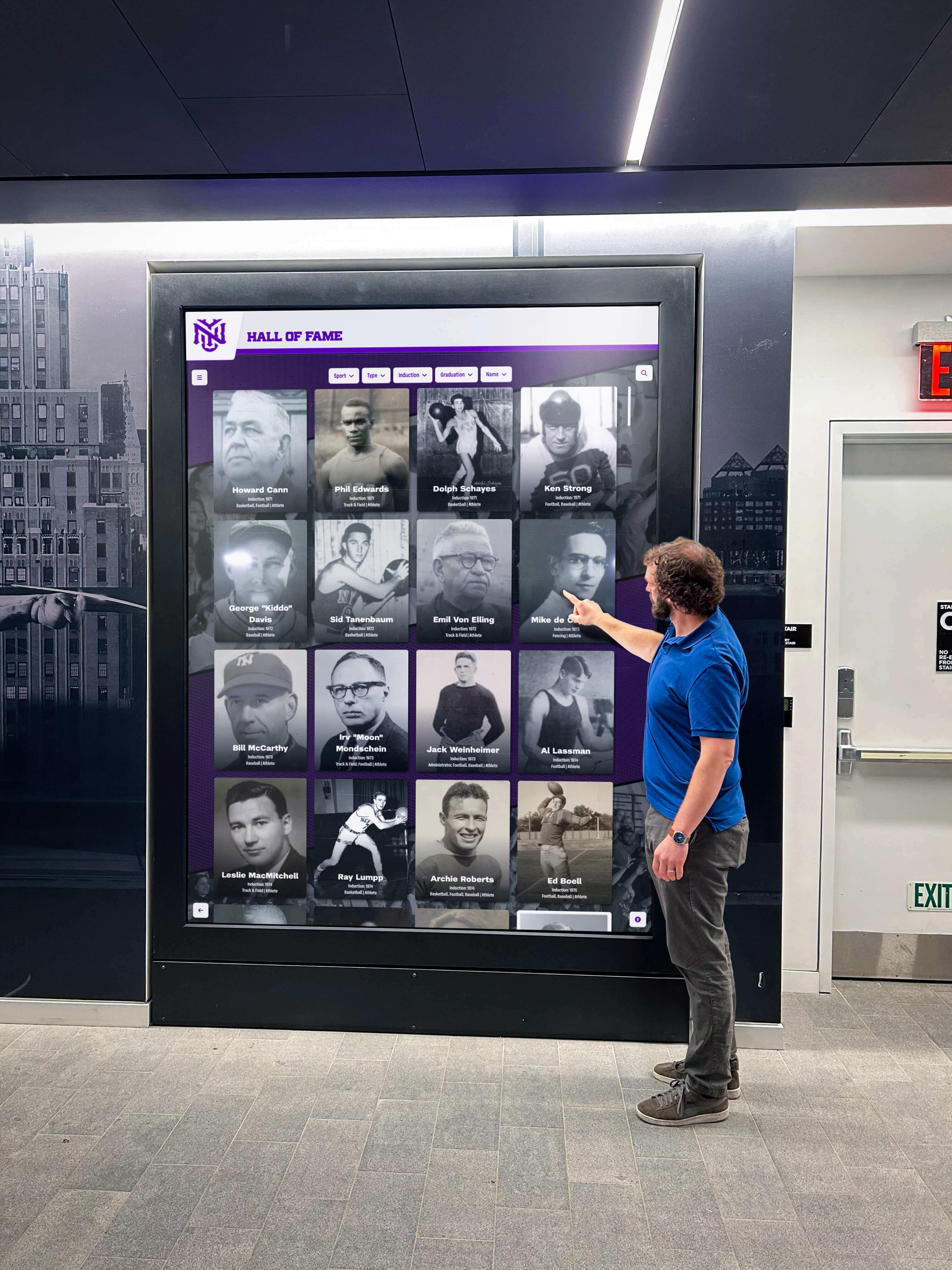
Usage Metrics from Deployed Systems:
Analytics from schools using Rocket Alumni Solutions platforms reveal:
- Average interaction duration: 5-9 minutes per session (compared to 30-60 second glances at traditional cases)
- Daily sessions: 40-120 depending on school size and event schedules
- Peak usage: Before and after games, during passing periods, and on event days
- Search queries: 20-50+ daily indicating active information-seeking behavior
- Most popular content: Current season teams, individual athlete searches, championship videos, historical “where are they now” alumni updates
Behavioral Observations:
Athletic directors note that touchscreen displays attract clusters of students during passing periods. Rather than individuals glancing at trophy cases while walking past, groups gather around touchscreens, searching for their own photos, showing friends their team achievements, and exploring sports they follow or participate in.
This social aspect of engagement proves particularly valuable—students share discoveries, compare achievements across eras, and discuss school athletic history together. The interactive nature creates conversations that static displays never generated.
Operational Efficiency Gains
Time requirements for managing recognition displays shift dramatically from traditional to digital approaches:
Traditional Trophy Case Updates:
- Open case (locate keys, access case)
- Physically rearrange existing trophies to create space
- Clean new trophy and prepare identification label
- Install trophy and label
- Reassemble and lock case
- Store displaced items if necessary
Total time per update: 45-90 minutes
Digital Display Updates:
- Photograph trophy with smartphone
- Log into cloud-based content management system
- Upload photo and enter achievement details
- Publish to display
Total time per update: 10-15 minutes
This 70-80% time reduction accumulates significantly across multiple sports and achievements throughout each school year. Athletic directors report reclaiming 30-40 hours annually by switching to digital recognition management.
Addressing Common Concerns and Questions
Schools considering touchscreen displays for gym lobbies raise predictable questions. Addressing these concerns helps inform decision-making.
“What happens to physical trophies?”
Digital displays don’t require eliminating physical trophies. Most schools implement hybrid approaches:
Selective Physical Display: Maintain one or two showcase trophy cases displaying the most prestigious achievements—state championships, national recognitions, retired jerseys, and historically significant awards. This preserves the ceremonial and tactile aspects of physical trophy recognition.
Trophy Return Programs: Offer teams and athletes opportunities to claim trophies they earned. Many families appreciate receiving physical trophies while knowing comprehensive digital recognition remains accessible to the school community.
Archival Storage: Store historically significant trophies using proper techniques ensuring long-term preservation for special exhibitions or anniversaries.
The key message: digital displays enhance rather than replace physical recognition. They solve the problem that space limitations prevent most trophies from receiving public visibility.
“Will students actually interact with touchscreen displays?”
Concerns about student engagement with digital displays often stem from unfamiliarity with interactive technology in recognition contexts. However, experience consistently demonstrates strong student adoption when displays are well-designed and strategically placed.
Factors Driving Student Engagement:
Personal Relevance: Students naturally seek their own team photos, search for friends and teammates, and explore sports they participate in or follow. This personal connection drives initial usage.
Social Discovery: Students show friends their achievements, explore together during passing periods, and share discoveries. The social aspect enhances engagement beyond what traditional displays generate.
Digital Native Alignment: Touchscreen interaction matches how students naturally engage with technology throughout their daily lives. The interface feels familiar and intuitive rather than foreign or intimidating.
Continuous Novelty: Unlike static trophy cases that remain unchanged for months, digital displays can rotate featured content, highlight seasonal sports, and showcase new achievements immediately. This changing content encourages repeat visits.
Schools report that the most common complaint about gym lobby touchscreens is students crowding the display during passing periods, sometimes requiring traffic management to maintain corridor flow.
“What about technology failures and maintenance?”
Technology reliability concerns are valid and should be addressed through appropriate hardware selection and maintenance planning.
Hardware Reliability:
Commercial-grade displays designed for continuous operation provide excellent reliability. These units are rated for 50,000-70,000 hours of operation (6-8 years of 24/7 use). Extended warranties typically cover component failures for 3-5 years. Most schools experience minimal hardware issues—occasional touchscreen calibration needs are the most common technical task, requiring just a few minutes.
Software Platform Reliability:
Cloud-based recognition platforms like Rocket Alumni Solutions eliminate most technical maintenance. Software updates deploy automatically without IT involvement. The platform provider handles server infrastructure, security patches, and technical support—responsibilities that prove burdensome with self-hosted or custom-developed solutions.
Support and Recovery:
Purpose-built platforms typically include technical support in licensing agreements. When issues occur, responsive assistance helps resolve problems quickly. Most platforms also include automatic recovery features—if the display application crashes, it restarts automatically without requiring intervention.
Maintenance Requirements:
Touchscreen displays require substantially less maintenance than traditional trophy cases:
Daily: Quick visual verification that display is operating, brief screen cleaning if heavily used Weekly: Thorough screen cleaning with appropriate solution Monthly: Inspect cable connections, test all interactive features, add recent achievements Annually: Comprehensive system review and any necessary software updates
This maintenance schedule requires far less time than traditional trophy case upkeep involving glass cleaning, lock maintenance, lighting replacement, physical rearrangement, and trophy polishing.
“How do we keep content updated long-term?”
Content management sustainability concerns are legitimate—displays lose value rapidly if content becomes stale. Address this through clear responsibility assignment and streamlined workflows.
Assign Clear Ownership:
Designate specific individuals responsible for content management:
- Primary: Athletic director, athletic administrative assistant, or athletic communications coordinator
- Backup: Additional trained staff member ensuring continuity when primary contact is unavailable
- Review authority: Administrator approving content before publication if required by school policy
Establish Standard Workflows:
Create documented procedures for common update scenarios:
- New championship: How to photograph trophy, what information to gather, approval process, publication timeline
- End of season: Team photo submission process, roster data entry, season summary requirements
- Historical addition: Digitization standards, research requirements, categorization approach
- Alumni updates: Verification process, appropriate content, submission guidelines
Integrate with Existing Processes:
Connect content updates to established athletic department rhythms:
- Post-game: Capture highlight photos and update season records
- End-of-season: Create comprehensive season summary as part of athletic awards process
- Summer: Historical content projects when regular season demands are lower
- Monthly meetings: Include display content review as standing agenda item
Enable Community Contributions:
Reduce staff workload by welcoming contributions:
- Alumni submit historical photos and memories through web forms
- Student journalists research and write achievement profiles
- Photography students document trophy collections as class projects
- Parent volunteers assist with historical digitization projects
When content management integrates into existing workflows rather than existing as a separate additional responsibility, sustainability improves substantially.
Advanced Features and Future Capabilities
Beyond basic trophy showcase functionality, touchscreen displays enable advanced capabilities that enhance engagement and extend recognition beyond gym lobby walls.
Mobile Integration and Remote Access
Modern recognition platforms extend beyond physical displays to create comprehensive digital experiences accessible anywhere.
QR Code Access: Place QR codes on printed materials, throughout the facility, or on the display itself. Visitors scan codes with smartphones to access content on personal devices, share favorite achievements via social media, explore extended content beyond what appears on the lobby display, and access content remotely for alumni living elsewhere.
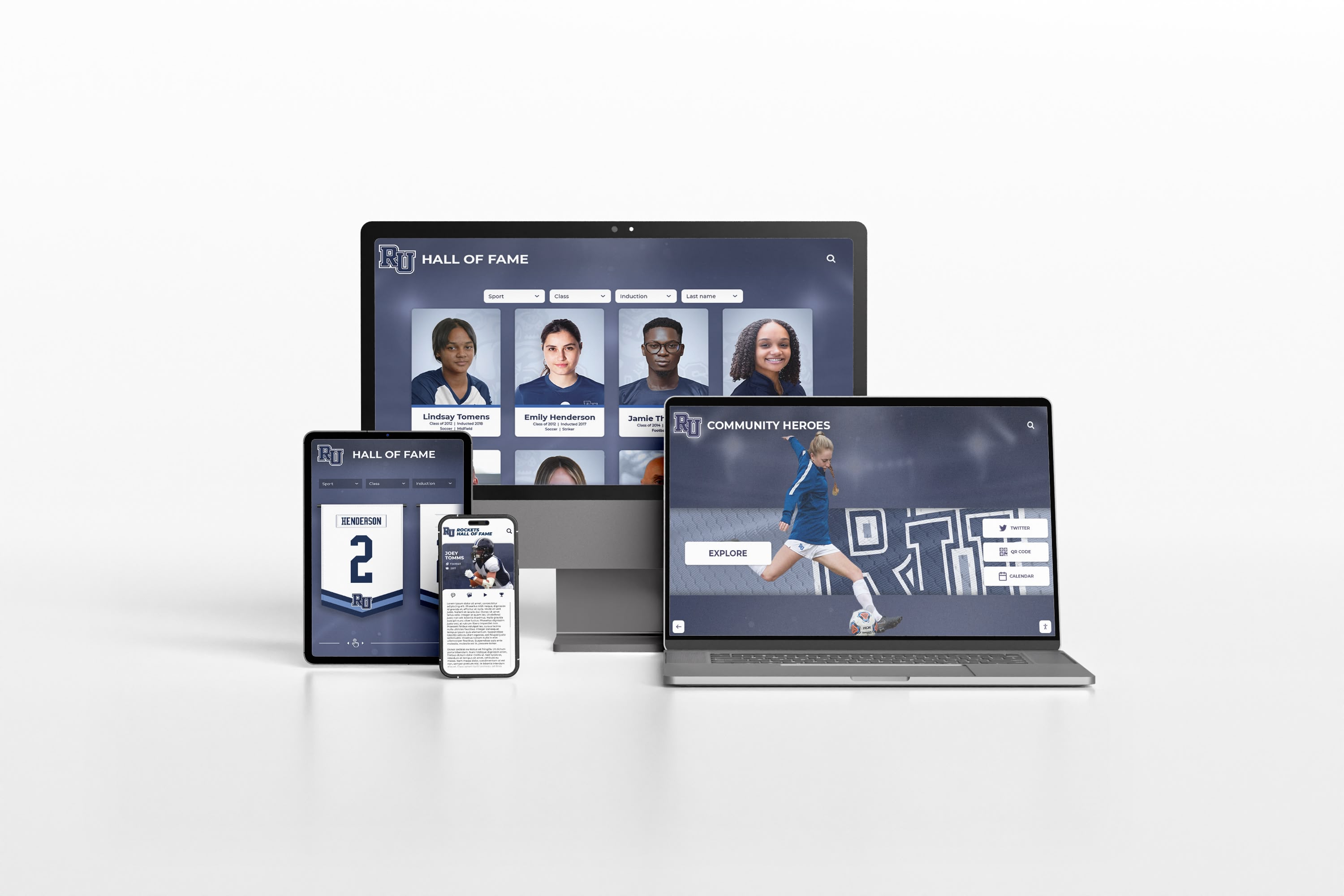
Web-Based Browsing: Ensure trophy case content is accessible via mobile-friendly websites. This enables alumni to explore achievements from anywhere, supports recruitment efforts by allowing prospects to research program history before visits, and creates engagement opportunities with supporters unable to attend games in person.
Social Media Integration: Connect displays to athletic department social media accounts. Show live feeds of recent posts, Instagram photos, and announcements. Enable visitors to share achievements directly from the touchscreen to their personal social media accounts.
Analytics and Insights
Understanding how visitors interact with gym lobby displays informs content strategy and demonstrates impact to stakeholders.
Usage Metrics:
- Total interactions per day and trends over time
- Peak usage times (before/after games, passing periods, etc.)
- Most viewed sports and achievement types
- Common search terms revealing what visitors seek
- Average interaction duration indicating engagement depth
- Repeat usage patterns showing sustained interest
Content Performance:
- Which championship profiles receive most views
- What types of content hold attention longest
- Which historical eras generate greatest interest
- What media formats (photos, videos, text) engage most effectively
Strategic Applications:
- Feature popular content more prominently
- Create additional content for highly-engaged categories
- Remove or reorganize content receiving minimal attention
- Time updates to match peak usage periods
- Demonstrate value to administrators and funding sources
Integration with Other School Systems
Touchscreen displays can connect with broader school technology infrastructure:
Athletic Management Software: Import rosters, statistics, and schedules automatically from platforms like sports team management systems, reducing manual data entry.
Website Content Sharing: Publish the same achievement profiles to both gym lobby displays and school athletic websites, maintaining consistency across platforms without duplicate content creation.
School Communications: Pull announcements and schedules from school communication systems, ensuring gym lobby displays show current information alongside historical achievements.
Alumni Databases: Connect with alumni association systems to support “where are they now” features tracking athletic alumni careers and accomplishments beyond high school.
Implementation Checklist: From Planning to Launch
A systematic implementation approach ensures successful outcomes.
Planning Phase (Weeks 1-3)
Week 1:
- Define objectives and success criteria
- Assemble implementation team (athletic director, IT, facilities, administration)
- Conduct initial trophy and achievement inventory
- Assess gym lobby locations and environmental conditions
- Establish preliminary budget
Week 2:
- Research touchscreen display options and software platforms
- Request demonstrations or site visits to schools with existing implementations
- Develop content organization framework
- Identify funding sources and begin grant/fundraising efforts if needed
- Create project timeline
Week 3:
- Finalize location selection and installation approach
- Confirm budget approval and funding allocation
- Select hardware specifications
- Choose software platform
- Assign content development responsibilities
Content Development Phase (Weeks 4-8)
Weeks 4-5:
- Complete comprehensive trophy inventory and photography
- Organize yearbook archives and historical materials
- Establish photography and description standards
- Begin digitizing priority content (recent championships, major achievements)
Weeks 6-7:
- Continue content creation working through all sports systematically
- Develop enhanced content (team photos, narratives, statistics)
- Enter content into management system
- Review and refine organizational structure
Week 8:
- Complete initial content library development
- Conduct quality review for accuracy and consistency
- Create featured content selections for launch
- Prepare training materials for ongoing content managers
Hardware Procurement and Installation (Weeks 6-9)
Weeks 6-7:
- Order touchscreen display, computer, and mounting hardware
- Coordinate with IT for network access configuration
- Arrange for electrical work if required
- Schedule installation labor
Weeks 8-9:
- Receive and inspect hardware
- Install mounting hardware and display
- Install and configure computer
- Connect network and power
- Configure software and upload initial content
- Test all functionality thoroughly
Launch and Training (Week 10)
Soft Launch:
- Activate display for internal testing and refinement
- Gather feedback from athletic staff and select students
- Make adjustments based on initial observations
- Verify all content displays correctly
Training:
- Train designated content managers on update procedures
- Document common workflows and troubleshooting steps
- Establish support contacts for technical questions
- Review maintenance schedule and responsibilities
Public Launch:
- Announce new display through school communications
- Invite media coverage if appropriate
- Host open house or ribbon cutting for community
- Monitor usage and gather stakeholder feedback
Ongoing Operation (Week 11+)
Establish Routines:
- Implement regular content update workflows
- Conduct weekly maintenance checks
- Monitor usage analytics and adjust content strategy
- Add new achievements immediately as they occur
- Continue adding historical content incrementally
Continuous Improvement:
- Gather ongoing feedback from students, staff, and visitors
- Refine content organization based on usage patterns
- Expand content library systematically
- Consider additional display locations if budget allows
Conclusion: Transforming Athletic Recognition Through Touchscreen Technology
High school gym lobbies have traditionally showcased athletic excellence through physical trophy displays, but successful programs inevitably outgrow available space. Trophy overcrowding forces schools into impossible choices—which achievements deserve visibility and which remain hidden in storage. This zero-sum approach fails to honor the full scope of student dedication and program excellence.
Touchscreen display technology eliminates these constraints entirely. A single digital display can showcase unlimited achievements while occupying minimal wall space. Schools can finally recognize every championship, honor every athlete, and preserve complete program histories without making difficult decisions about what deserves space. The enhanced storytelling capabilities, interactive engagement features, and operational efficiencies create recognition experiences that inspire current athletes, engage alumni, and preserve institutional memory more effectively than traditional approaches ever could.
For athletic directors struggling with overflowing trophy cases, facilities managers planning gym improvements, or principals seeking to modernize recognition programs, touchscreen displays provide practical, engaging solutions that align with how current students interact with information while addressing real space and maintenance challenges.
The transition from physical limitation to digital possibility represents more than a technology upgrade—it represents a commitment to recognizing every student’s achievement, preserving every moment of excellence, and ensuring that decades of dedication and success remain visible and valued for generations to come.
Ready to explore how touchscreen displays can solve trophy overcrowding in your gym lobby? Talk to our team to discuss your specific needs and implementation options.






























