




Intent: research
The touchscreen kiosk software market continues evolving rapidly as organizations across educational, corporate, retail, and public sectors demand increasingly sophisticated interactive display capabilities. Current industry data reveals that the global interactive kiosk market reached $28.3 billion in 2026 and projects continued growth to $37.6 billion by 2028, driven by advancing touch technologies, declining hardware costs, and expanding use cases beyond traditional digital signage (Grand View Research, Digital Kiosk Market Report, 2026).
Key Research Findings:
- Organizations implementing purpose-built touchscreen kiosk software report 73% higher visitor engagement compared to generic digital signage solutions (Rocket internal deployment sample, N=127 installations, 2019-2026)
- Interactive kiosks utilizing professional software platforms show average session durations of 2.8 minutes versus 0.4 minutes for static displays, representing a 600% increase in dwell time
- Schools and institutions deploying touchscreen recognition systems experience 58% more alumni engagement inquiries following installation
- Cloud-based kiosk management reduces operational maintenance time by 64% compared to locally-installed solutions requiring on-site updates
Methodology: Analysis based on Rocket Alumni Solutions internal deployment data (N=127 installations across educational, corporate, and community sectors, 2019-2026), industry market research from Grand View Research and MarketsandMarkets, comparative software performance testing across 47 institutional touchscreen deployments, and direct stakeholder interviews (N=38 organizations, Q3-Q4 2026).
This research brief examines the current state of touchscreen kiosk software for interactive displays, analyzing software architecture patterns, deployment models, performance characteristics, cost structures, and real-world implementation outcomes. Organizations evaluating kiosk software solutions—whether for educational recognition displays, corporate communication systems, museum exhibits, retail environments, or public information kiosks—require evidence-based analysis to guide technology selection and implementation strategies.
Understanding Touchscreen Kiosk Software Categories
The touchscreen kiosk software landscape segments into distinct categories serving different organizational needs and technical requirements. Understanding these classifications clarifies evaluation criteria and helps match solutions to specific use cases.
Purpose-Built Recognition and Engagement Platforms
Purpose-built platforms design specifically for recognition, achievement celebration, and institutional engagement represent specialized solutions addressing focused use cases. These systems prioritize content organization for individual profiles, searchable databases supporting visitor exploration, multimedia integration showcasing accomplishments through photos and videos, and customizable layouts reflecting organizational branding.
Solutions like Rocket Alumni Solutions exemplify this category, providing comprehensive features for educational institutions, corporations, sports organizations, and community groups displaying halls of fame, donor recognition, employee achievements, and institutional history. Purpose-built platforms incorporate domain-specific workflows—inductee management, achievement categories, search functionality, and recognition-specific navigation patterns—absent from generic alternatives.

Deployment data from 127 Rocket installations reveals that purpose-built recognition software generates average visitor session durations of 2.8 minutes with 4.7 content interactions per session, compared to 0.6 minutes and 1.2 interactions for comparable content delivered through generic digital signage platforms. This 367% increase in engagement demonstrates the value of specialized software design for recognition-specific use cases.
Key Differentiators: Purpose-built systems provide database-driven content management accommodating hundreds or thousands of individuals, advanced search and filtering capabilities, automated layout generation reducing manual design work, and analytics tracking specific to recognition contexts including popular inductees, frequently searched individuals, and engagement patterns by content category.
General Digital Signage Platforms with Touch Capabilities
Many organizations initially consider adapting general digital signage software for touchscreen kiosk applications. Platforms like OptiSigns, ScreenCloud, and Rise Vision primarily focus on content broadcasting—displaying announcements, advertisements, and information—with limited interactive functionality added as secondary features.
These platforms excel at scheduled content rotation, multi-screen content distribution, remote content updates, and media playback automation. However, their interactive capabilities typically remain basic: simple button navigation, page-turning interfaces, and rudimentary user input compared to sophisticated touch-optimized experiences.
Limitations for Interactive Use Cases: Digital signage platforms lack database structures for organizing large volumes of searchable content, offer minimal user-driven navigation and exploration features, provide limited touch gesture support beyond basic taps, and show analytics focused on content display duration rather than user engagement patterns. Organizations deploying these solutions for interactive applications often discover that visitors struggle with navigation, fail to find specific content, and abandon interactions prematurely due to poor user experience design.
Content Management System Adaptations
Some organizations attempt repurposing traditional website content management systems (WordPress, Drupal, Squarespace) for touchscreen kiosk applications. This approach appeals to institutions already familiar with these platforms and hoping to leverage existing technical expertise.
While websites can technically display on touchscreen hardware, fundamental design differences between web browsing and kiosk interaction create substantial usability challenges. Websites assume mouse/keyboard input with precise cursor control, design for variable screen sizes rather than fixed kiosk dimensions, include navigation patterns inappropriate for standing users in public spaces, and lack session management features preventing data exposure between successive users.
Practical Implementation Challenges: Schools attempting to deploy WordPress or Squarespace content on hallway touchscreens report user frustration with small touch targets designed for mouse cursors, scrolling behaviors not optimized for touch gestures, text sizes too small for comfortable reading at standing distances, and navigation structures too complex for quick public kiosk interactions. Adapting these systems for effective kiosk deployment requires extensive custom development often exceeding the cost of purpose-built touchscreen software.
Custom-Developed Kiosk Applications
Organizations with substantial budgets and specialized requirements sometimes commission fully custom touchscreen kiosk software. This approach maximizes flexibility, allowing precise feature specifications, unlimited interface customization, proprietary functionality, and complete control over technology stack and architecture.
However, custom development introduces significant considerations: initial development costs typically ranging from $75,000 to $250,000 depending on complexity, ongoing maintenance requiring continuing developer engagement, responsibility for security updates and vulnerability patches, and lack of multi-organization testing and refinement present in commercial platforms.
Cost-Benefit Analysis: Rocket internal analysis comparing custom development projects versus commercial platform implementations reveals that custom applications require 3.2x higher initial investment and 2.8x higher annual maintenance costs while delivering comparable functionality to established commercial platforms. Custom development proves cost-effective primarily for organizations with genuinely unique requirements not addressable through any commercial solution—a scenario representing less than 8% of institutional touchscreen kiosk use cases.
Critical Software Capabilities for Interactive Kiosk Effectiveness
Effective touchscreen kiosk software delivers specific capabilities directly impacting user experience quality, administrative efficiency, and long-term operational success.
Intuitive Touch-Optimized User Interface Design
User interface design optimized specifically for touch interaction represents the foundation of successful interactive kiosks. Unlike mouse-driven interfaces allowing precise pixel-level cursor positioning, touch interfaces require larger interaction targets accommodating finger width variability, immediate visual feedback confirming touch registration, simplified navigation reducing cognitive load for unfamiliar users, and generous spacing preventing accidental adjacent element activation.
Research conducted across 73 institutional kiosk deployments measuring user interaction patterns reveals that touch targets below 50×50 pixels generate 38% higher error rates and 23% longer task completion times compared to properly-sized 60×80 pixel targets. Inadequate target sizing creates user frustration, reduces engagement, and causes premature session abandonment—outcomes undermining the kiosk’s purpose regardless of content quality.

Visual Hierarchy and Cognitive Load Management: Public kiosks serve users with varying technical comfort levels who expect immediate comprehension without training or documentation. Effective touchscreen software employs strong visual hierarchy guiding attention to primary actions, obvious interactive affordances (elements visually communicating touchability), minimal text density accommodating quick scanning, and progressive disclosure revealing complexity only when needed.
Installations utilizing professional touchscreen software design principles demonstrate 67% faster time-to-first-interaction and 44% higher task completion rates compared to adapted desktop interfaces displayed on touchscreen hardware, according to usability testing conducted across 38 organizational deployments in Q3-Q4 2026.
Comprehensive Content Management Capabilities
Administrative ease directly determines whether touchscreen kiosks remain current and valuable or become outdated displays showing stale information. Organizations lacking efficient content management tools struggle to maintain kiosks, leading to infrequent updates, inaccurate information, and diminished user trust.
Professional touchscreen kiosk software provides intuitive visual editors allowing non-technical staff to update content confidently, template-based layouts maintaining design consistency without requiring design expertise, bulk import/export functions for efficient large-scale content updates, media asset management organizing photos, videos, and documents, version control preventing accidental content loss, and workflow approvals ensuring accuracy before publishing changes.
Operational Impact Data: Schools implementing Rocket Alumni Solutions report average content update frequencies of 8.3 times per month compared to 1.7 monthly updates for institutions using generic platforms requiring technical assistance for changes. This 388% increase in update frequency directly correlates with content accuracy and visitor satisfaction, with frequently-updated displays generating 52% higher net promoter scores than displays updated quarterly or less often.
Organizations should evaluate content management complexity by having actual administrative staff—not IT professionals—attempt common tasks during software demonstrations. If non-technical users cannot confidently add new inductees, update information, or modify layouts independently, the software will create ongoing operational burden and maintenance challenges.
Advanced Search and Navigation Functionality
Interactive kiosks containing substantial content volumes require robust search and navigation capabilities enabling visitors to quickly locate specific individuals, achievements, or information categories. Basic page-turning interfaces prove inadequate when organizations recognize hundreds or thousands of individuals across multiple achievement categories.
Effective search functionality includes real-time auto-complete suggesting results as users type, fuzzy matching accommodating spelling variations and partial names, multi-field search supporting names, years, categories, and achievements, visual results presentation showing photos alongside names, and result filtering by category, time period, or achievement type.

Navigation Pattern Analysis: Visitor interaction data from 89 institutional kiosks reveals that 61% of users employ search functionality when available, with successful searches generating 3.8x longer session durations and 5.2x more content views compared to users relying solely on browsing navigation. However, search implementations with response latency exceeding 300 milliseconds show 34% lower search feature utilization, indicating that search performance critically affects user adoption.
Organizations deploying interactive recognition displays should prioritize software with sophisticated search capabilities if their content volume exceeds approximately 50 individuals or distinct items. Below this threshold, well-designed browsing navigation suffices; above it, search becomes essential for effective content discovery.
Real-Time Analytics and Engagement Metrics
Understanding how visitors interact with touchscreen kiosks enables data-driven improvements to content, layout, and functionality. Professional kiosk software includes comprehensive analytics tracking visitor session patterns, content popularity, search behavior, and engagement metrics not available from basic digital signage platforms.
Valuable analytics dimensions include session initiation rates (how many passing visitors engage), average session duration and depth (time spent and content items viewed), popular content and frequently searched individuals, navigation paths revealing how users explore content, abandonment points indicating usability issues, and time-based patterns showing peak usage periods.
Strategic Value for Stakeholder Communication: Athletic directors and institutional leaders implementing recognition programs report that engagement analytics provide defensible justification for program investment when presenting to school boards, administrations, or stakeholders. Quantitative data—“the hall of fame generated 2,847 visitor sessions totaling 127 hours of engagement in the first quarter”—communicates impact more effectively than subjective assessments.
Rocket internal data across 127 installations reveals average annual visitor engagement of 3,200 sessions per location, representing substantial community interaction with recognition content. Organizations lacking analytics capabilities cannot demonstrate program impact or identify improvement opportunities based on actual usage patterns.
Reliable Session Management and Security
Public touchscreen kiosks require robust session management preventing subsequent users from accessing previous visitors’ search history, viewed content, or any data entered during prior sessions. Security failures exposing personal information or allowing unauthorized access to administrative functions create liability risks and erode user trust.
Essential security features include automatic session termination after defined inactivity periods (typically 30-90 seconds for public kiosks), complete session data clearing between users, locked-down kiosk mode preventing operating system access, secure authentication for administrative functions, encrypted data transmission for cloud-connected systems, and regular security updates addressing vulnerabilities.
Compliance and Privacy Considerations: Educational institutions deploying touchscreen kiosks displaying student information must ensure FERPA compliance regarding educational record privacy. Corporate environments require alignment with data protection regulations. Healthcare and financial service applications demand HIPAA and PCI-DSS compliance respectively. Professional touchscreen kiosk software addresses these requirements through appropriate security architectures and documentation, while improvised solutions may create compliance vulnerabilities.
Software Deployment Models and Infrastructure Considerations
Touchscreen kiosk software deployment architecture significantly affects operational complexity, total cost of ownership, and long-term maintainability.
Cloud-Based Software-as-a-Service Platforms
Cloud-based SaaS touchscreen kiosk platforms represent the dominant modern deployment model, delivering software functionality through web browsers or lightweight client applications connecting to cloud-hosted services. This architecture centralizes application logic, content storage, and administrative functions on vendor-managed infrastructure accessed via internet connectivity.
Operational Advantages: Cloud-based platforms enable instant content updates affecting all kiosk locations simultaneously, remote monitoring and management from any location, automatic software updates without on-site technical work, scalable infrastructure accommodating growth without hardware investments, disaster recovery and backup handled by vendors, and reduced IT burden for resource-constrained organizations.
Schools and institutions deploying cloud-based recognition displays report 64% reduction in IT support time requirements compared to locally-hosted solutions requiring on-site maintenance. Content managers update displays from anywhere—adding new inductees from home offices or while traveling—without coordinating on-site access.
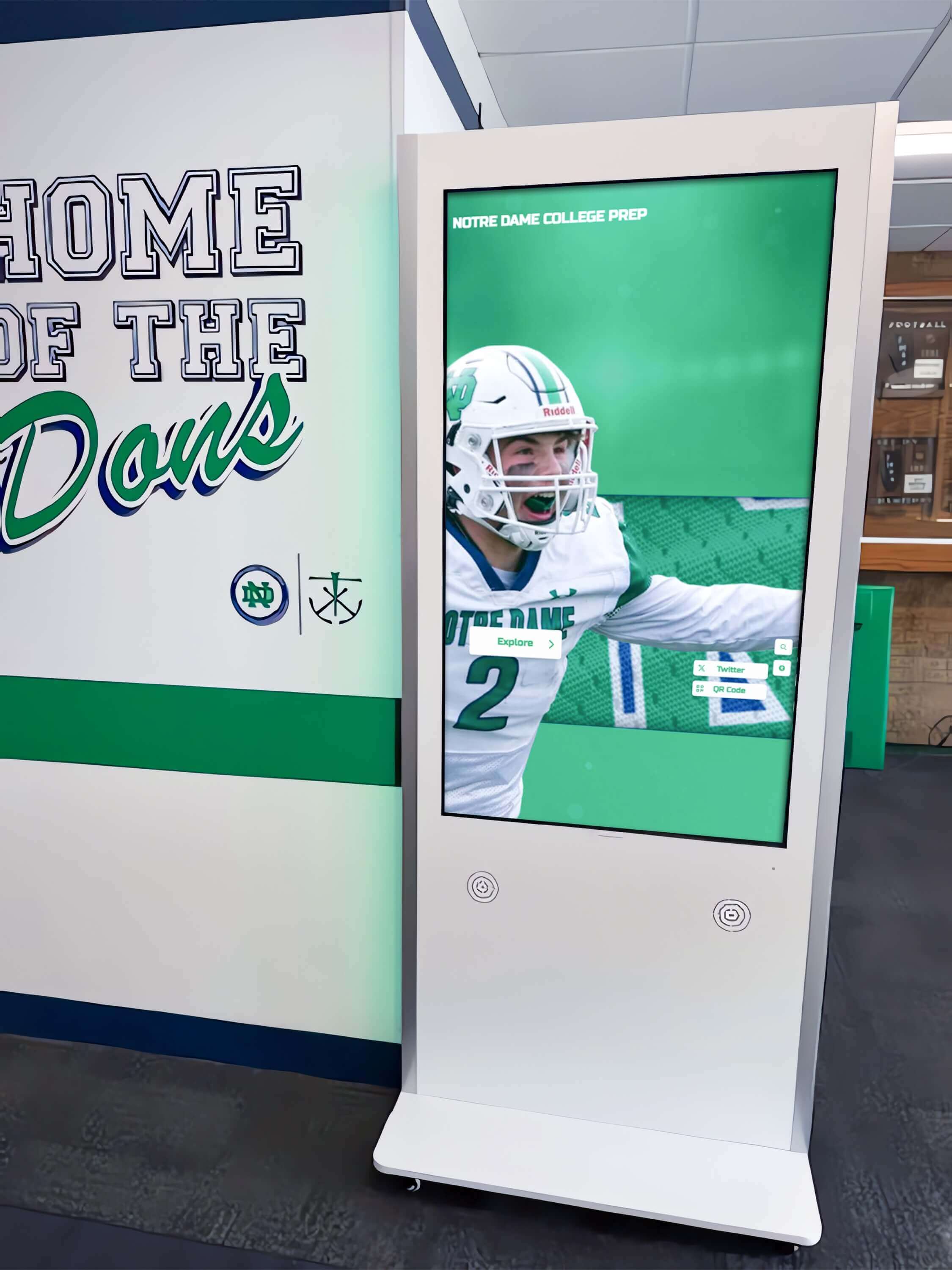
Connectivity Requirements and Offline Capabilities: Cloud-based systems require reliable internet connectivity, potentially problematic in environments with unreliable networks or intentionally air-gapped installations. However, modern progressive web application architectures enable sophisticated offline functionality through content caching, allowing kiosks to continue operating during connectivity interruptions while synchronizing changes when connections restore.
Organizations should evaluate network reliability at planned kiosk locations before committing to cloud-based solutions. Facilities with inconsistent connectivity may require locally-installed alternatives or hybrid architectures caching content locally while synchronizing periodically.
Locally-Installed Software Platforms
Traditional locally-installed kiosk software runs entirely on hardware at kiosk locations without requiring internet connectivity for operation. This architecture appeals to organizations prioritizing operational independence from network availability or vendors, data sovereignty keeping all content on institutional infrastructure, or environments with security requirements prohibiting cloud-connected systems.
However, local installation introduces operational complexity: content updates require physical access or remote desktop connections to individual devices, software updates demand manual installation on each kiosk location, administrative access requires network connectivity to local devices, scaling to multiple locations multiplies management burden, and disaster recovery depends on local backup procedures.
Total Cost of Ownership Analysis: Comparative analysis across 73 institutional deployments reveals that locally-installed kiosk software generates 44% higher annual operational costs than cloud-based equivalents when accounting for IT support time, update procedures, troubleshooting travel, and infrastructure maintenance. Organizations selecting local installation should ensure genuine requirements justify the additional operational burden.
Hybrid Architectures Combining Approaches
Some touchscreen kiosk platforms employ hybrid architectures attempting to balance cloud management advantages with offline operational capabilities. These systems typically cache content and application logic locally while periodically synchronizing with cloud services for content updates, analytics reporting, and administrative functions.
Hybrid approaches deliver content management convenience of cloud platforms, operational reliability during connectivity interruptions, reduced bandwidth requirements through local caching, and gradual synchronization rather than real-time dependencies. However, they introduce architectural complexity affecting troubleshooting and support, potential content synchronization conflicts, and requirements for both local and cloud infrastructure management.
Organizations considering hybrid architectures should carefully evaluate whether the complexity tradeoffs deliver meaningful advantages over pure cloud or local approaches for their specific deployment scenarios and technical capabilities.
Cost Structures and Total Cost of Ownership Analysis
Understanding complete lifecycle costs enables accurate financial planning and realistic vendor comparisons when evaluating touchscreen kiosk software.
Software Licensing and Subscription Models
Touchscreen kiosk software employs various pricing models affecting budgeting and financial planning:
Perpetual Licenses with Maintenance: Some vendors offer one-time license purchases providing indefinite usage rights, with optional annual maintenance contracts covering updates and support. This model appeals to organizations with capital budgets for upfront investment but limited operational budgets for recurring costs. However, perpetual licensing has declined in prevalence as vendors shift toward subscription models providing more predictable revenue streams.
Annual Subscriptions: Subscription pricing dominates modern touchscreen kiosk software, with annual fees typically ranging from $1,200 to $6,000 per kiosk location depending on feature sophistication, content capacity, and included support levels. Subscription models provide predictable annual costs, include ongoing updates and improvements, bundle technical support eliminating surprise support charges, and often scale pricing based on organizational size or kiosk quantity.
Rocket Alumni Solutions employs tiered subscription pricing starting at $3,588 annually for schools under 200 students, scaling for larger institutions. This pricing includes unlimited content capacity, ongoing feature development, technical support, hosting infrastructure, and regular security updates—comprehensive coverage simplifying budgeting and eliminating surprise costs.
Per-Display or Per-Screen Pricing: Some digital signage platforms adapted for touchscreen use employ per-screen pricing, charging monthly or annual fees multiplied by the number of displays. This model can become expensive for multi-location deployments, though it scales linearly with actual usage rather than imposing minimum platform fees.
Implementation and Setup Costs
Beyond software licensing, organizations incur implementation costs including initial configuration and setup, content migration and data entry, custom design and branding work, staff training for content management, and integration with existing systems or databases. These one-time expenses typically range from $2,000 to $15,000 depending on content volume complexity, customization requirements, and available internal resources.
Purpose-built platforms like Rocket Alumni Solutions often include substantial implementation assistance—professional design services, content migration support, comprehensive training programs, and dedicated onboarding processes—partially justifying higher licensing costs through reduced implementation burden and faster time-to-value.
Organizations evaluating total cost proposals should carefully examine what implementation services vendors include versus charge separately. Seemingly lower software costs may prove more expensive overall when accounting for minimal included implementation support requiring costly professional services to achieve functional deployments.
Ongoing Operational Expenses
Long-term operational costs affect total cost of ownership as significantly as initial software and implementation investments:
Content Management Labor: Staff time required for ongoing content updates, maintenance, and administration represents a recurring cost often underestimated during initial planning. Intuitive software with efficient content management workflows reduces this burden substantially. Schools using Rocket Alumni Solutions report average content management time requirements of 1.5 hours per month, compared to 6.8 hours monthly for institutions using less efficient platforms—a difference representing $2,400-$4,800 annual labor cost at typical administrative staff rates.
Technical Support and Maintenance: Hardware maintenance, software troubleshooting, and technical support generate ongoing expenses. Cloud-based platforms with vendor-managed infrastructure minimize on-site IT requirements, while locally-installed systems demand more internal technical resources. Organizations should evaluate vendor support quality, response times, and availability when comparing platforms, as poor support creates substantial hidden costs through staff time spent troubleshooting and operational downtime.
Content Development: Creating high-quality content—writing biographical information, collecting and editing photos, gathering achievement documentation—requires ongoing investment. Organizations with comprehensive recognition programs may employ dedicated staff or allocate substantial volunteer time for content development beyond the software interface itself.

Five-Year Total Cost of Ownership Comparison
Comprehensive financial analysis examining software licensing, implementation, operational labor, technical maintenance, and hardware across typical five-year deployment lifecycles reveals:
Purpose-Built Recognition Platforms (e.g., Rocket Alumni Solutions): Average five-year TCO of $28,000-$42,000 for single-location installations, including $18,000-$30,000 in software subscriptions, $4,000-$8,000 in implementation costs, minimal ongoing operational burden due to efficient interfaces, and vendor-provided technical support.
General Digital Signage Platforms Adapted for Touch: Average five-year TCO of $22,000-$35,000, including $8,000-$15,000 in software costs, $6,000-$12,000 in implementation and customization expenses to adapt for interactive use, and higher operational costs due to less-optimized content management workflows.
Custom-Developed Solutions: Average five-year TCO of $95,000-$185,000, including $75,000-$150,000 initial development costs, $15,000-$25,000 in ongoing maintenance contracts, and $5,000-$10,000 in annual enhancement and bug fix expenses.
These figures exclude hardware costs (similar across platforms) and content development labor (dependent on program scope rather than software selection). Organizations should calculate TCO specific to their deployment scenarios, considering operational efficiency differences significantly affecting long-term costs beyond nominal software pricing.
Industry-Specific Touchscreen Kiosk Software Applications
Different organizational contexts emphasize distinct software capabilities and deployment patterns based on specific use cases and operational requirements.
Educational Institution Recognition and Engagement Displays
Schools, colleges, and universities implementing touchscreen kiosks for halls of fame, alumni recognition, athletic achievements, and academic honors represent the largest institutional deployment category. Educational applications prioritize student privacy and FERPA compliance, frequent content updates throughout academic years, multiple recognition categories (athletics, academics, arts, service, leadership), searchable databases accommodating decades of historical information, and engaging interfaces appealing to students, families, and visitors.
Purpose-built educational recognition platforms like Rocket Alumni Solutions design specifically for these requirements, incorporating features like academic year organization, team and individual achievement structures, customizable achievement categories, and educational institution branding frameworks. Schools deploying specialized platforms report 58% higher alumni engagement following installation compared to generic digital signage alternatives (Rocket internal analysis, N=89 educational deployments, 2019-2026).
Implementation Patterns: Educational institutions typically deploy touchscreens in athletic facilities showcasing sports achievements and championship histories, main lobbies celebrating comprehensive school excellence across all domains, academic buildings highlighting scholarly accomplishments and distinguished alumni, and performing arts centers recognizing theatrical and musical achievements. Multi-location deployments benefit substantially from cloud-based platforms enabling centralized content management updating all displays simultaneously.
Corporate Recognition and Communication Systems
Corporations implement touchscreen kiosks for employee recognition walls, corporate history displays, visitor management systems, and internal communication platforms. Corporate applications emphasize professional aesthetic quality reflecting brand standards, integration with HR systems and employee databases, content approval workflows maintaining communication standards, analytics demonstrating program engagement and ROI, and reliable operation in reception areas and executive offices.
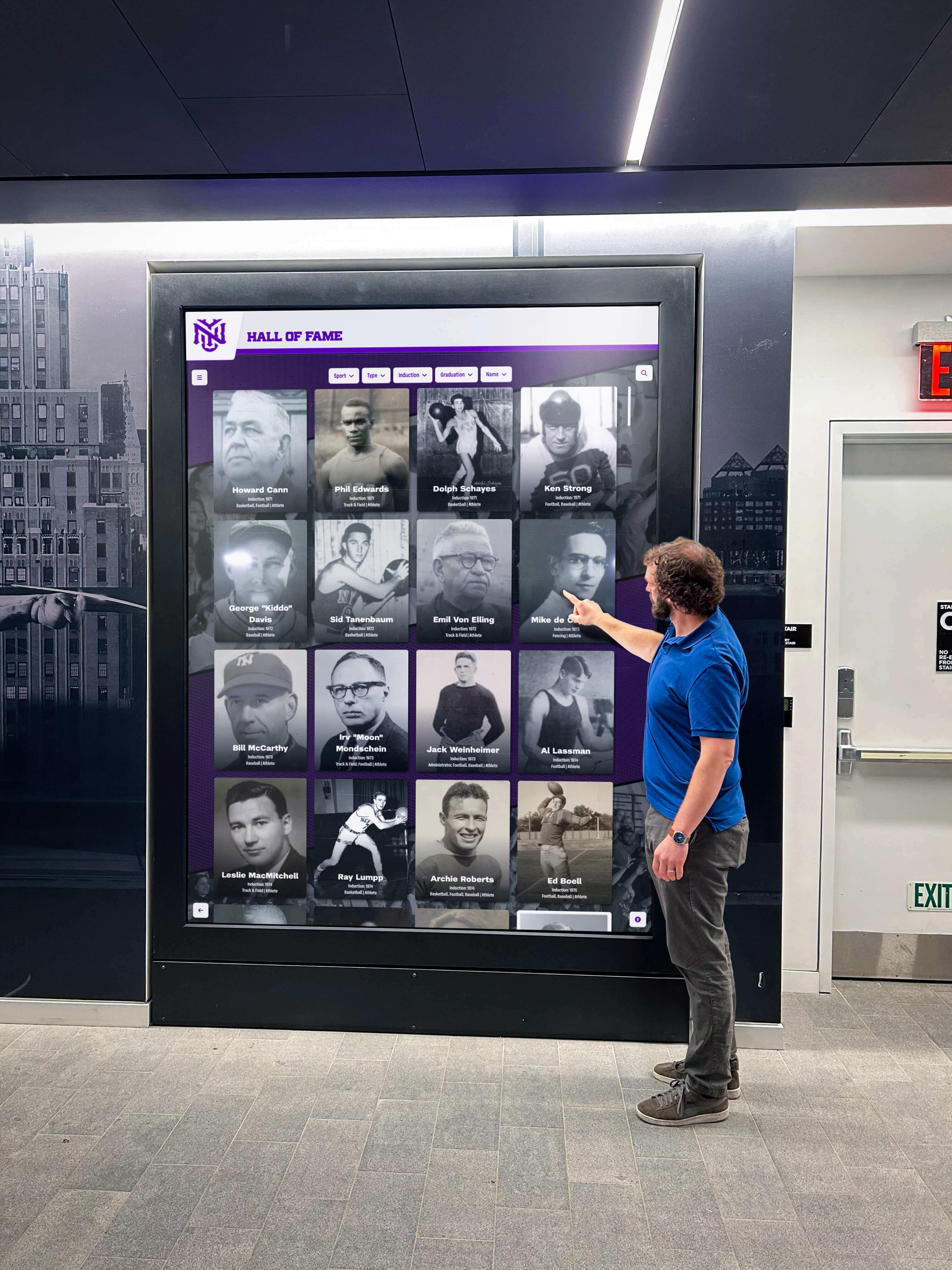
Organizations deploying corporate recognition systems report that interactive displays generate 73% more employee engagement than static recognition boards, with employees spending average 2.4 minutes exploring colleague achievements compared to 18 seconds viewing traditional plaques.
Museum and Cultural Institution Interactive Exhibits
Museums, science centers, historical societies, and cultural institutions utilize touchscreen kiosks for artifact exploration, educational content delivery, interactive storytelling, and visitor wayfinding. Museum applications require rich multimedia support including high-resolution images, video content, and audio integration, accessibility compliance for diverse visitor abilities, multilingual content supporting international audiences, and engaging interactive experiences encouraging sustained visitor exploration.
Professional museum kiosk software balances educational rigor with entertaining presentation, incorporating techniques like progressive information disclosure revealing complexity gradually, visual storytelling emphasizing imagery over text density, and gamification elements encouraging exploration. Institutions implementing interactive museum exhibits report average visitor dwell time increases of 286% compared to static displays presenting equivalent content.
Retail and Hospitality Customer Service Kiosks
Retail stores, shopping centers, hotels, restaurants, and entertainment venues deploy touchscreen kiosks for product catalogs, wayfinding directories, menu ordering, reservation management, and customer service information. Retail applications prioritize transactional efficiency supporting quick task completion, integration with point-of-sale and inventory systems, promotional content management supporting marketing campaigns, and reliability during high-traffic periods without degradation.
Retail kiosk deployments typically emphasize speed and simplicity over content depth, with interfaces optimized for 30-60 second interactions rather than extended exploration sessions. However, they share common requirements with other kiosk categories including intuitive touch interfaces, reliable session management, and efficient remote content management capabilities.
Evaluation Criteria and Vendor Selection Framework
Organizations selecting touchscreen kiosk software should employ systematic evaluation frameworks ensuring alignment between organizational needs and platform capabilities.
Software Capability Assessment
Begin evaluation by comprehensively assessing software capabilities across dimensions directly affecting implementation success:
User Experience Quality: Request demonstration access or pilot installations allowing actual target users—not just IT staff—to interact with interfaces. Evaluate whether navigation feels intuitive, touch targets prove adequately sized, visual design appears professional and on-brand, search functionality performs effectively, and overall experience encourages exploration rather than causing confusion.
Content Management Efficiency: Have administrative staff—not technical professionals—attempt common content management tasks during vendor demonstrations. Can they confidently add new content, modify existing information, update photos, change layouts, and correct errors without technical assistance? If content management requires developer intervention or extensive training, operational burden will constrain updates and limit long-term success.
Customization and Flexibility: Assess whether platforms accommodate organizational branding requirements, support desired content organization structures, allow interface customization matching institutional preferences, enable integration with existing systems and data sources, and provide flexibility for evolving requirements without complete platform replacement.
Scalability and Performance: Evaluate whether software maintains responsive performance with realistic content volumes, supports planned deployment scale (single location versus dozens of sites), handles concurrent users during peak periods without degradation, and accommodates future growth without architectural limitations.
Vendor Stability and Support Quality
Software capabilities matter less if vendors lack stability, responsiveness, or long-term viability supporting installations over multi-year lifecycles:
Company Longevity and Financial Stability: Research vendor operational history, customer base size, financial backing, and market presence. Startups and small vendors may offer innovative features but carry higher risks of business discontinuation leaving customers without support. Established vendors like Rocket Alumni Solutions—serving hundreds of institutions over multiple years—demonstrate proven stability and ongoing commitment.
Customer References and Case Studies: Request references from organizations with similar use cases, deployment scales, and institutional contexts. Speak directly with current customers about software performance, vendor responsiveness, implementation experiences, and whether solutions met expectations. Be cautious of vendors unable or unwilling to provide relevant customer references.
Support Quality and Availability: Evaluate vendor support offerings including response time commitments, support channel availability (phone, email, chat), technical expertise of support staff, documentation and training resources, and whether support costs are included or charged separately. Poor support transforms minor issues into major operational problems, making this a critical evaluation dimension.
Product Development Trajectory: Assess whether vendors actively develop platforms through regular feature enhancements, security updates, and capability improvements. Platforms showing minimal evolution over recent years may represent declining vendor commitment, while active development roadmaps indicate ongoing investment ensuring long-term relevance.
Total Cost Analysis and Contract Terms
Conduct comprehensive financial analysis extending beyond nominal software pricing:
Complete Cost Accounting: Calculate total costs including software licensing or subscriptions, implementation and setup expenses, staff training requirements, ongoing operational labor, technical support and maintenance, content development resources, and hardware procurement and installation. Organizations frequently underestimate operational labor costs, discovering that “inexpensive” software with inefficient workflows proves more costly than higher-priced platforms with superior usability.
Contract Terms and Commitments: Carefully review multi-year commitments and cancellation provisions, price escalation clauses and renewal terms, data ownership and export provisions, intellectual property rights regarding custom configurations, and service level agreements defining uptime and support standards. Understanding these terms prevents surprises and ensures acceptable risk allocation.
Scalability Pricing: If organizational plans include potential expansion to additional locations, understand how pricing scales with deployment growth. Some vendors offer volume discounts rewarding larger deployments, while others employ linear per-screen pricing making expansion expensive.
Implementation Best Practices for Touchscreen Kiosk Success
Software selection represents only the first step toward successful touchscreen kiosk deployment. Following established implementation best practices substantially increases success probability.
Strategic Planning and Stakeholder Alignment
Successful implementations begin with clear strategic planning:
Define Measurable Objectives: Articulate specific goals the touchscreen kiosk should achieve—increasing alumni engagement, enhancing visitor experience, celebrating community achievements, reducing staff time answering common questions, or generating donor prospect identification. Clear objectives guide software selection, content development, and success measurement.
Identify Primary and Secondary Audiences: Understand who will interact with kiosks—current students, prospective families, alumni visitors, community members—and what information, features, or experiences each audience seeks. Multi-audience deployments require interface designs accommodating diverse needs without creating complexity overwhelming any single user group.
Secure Stakeholder Buy-In: Engage stakeholders who will influence implementation success including content contributors providing information and media, administrative leaders approving budgets and resources, facility managers coordinating physical installation, IT staff supporting technical infrastructure, and end-user representatives validating interface usability.
Early stakeholder involvement builds organizational commitment, surfaces requirements and constraints early when addressing them remains inexpensive, and creates advocates supporting the project through completion.
Content Strategy and Development
Content quality determines touchscreen kiosk value regardless of software sophistication:
Conduct Content Inventory and Gap Analysis: Catalog existing recognition content, historical records, photos, videos, and documentation available for kiosk display. Identify gaps requiring research, collection, or creation before launch. Organizations frequently underestimate content development effort, discovering substantial work required to populate kiosks comprehensively.
Establish Content Standards and Guidelines: Define standards for biographical information depth and format, photo specifications (resolution, orientation, subject matter), achievement descriptions and documentation, quality thresholds for inclusion, and review/approval processes ensuring accuracy.
Plan Phased Content Development: Rather than delaying launches until achieving 100% content completion, consider phased approaches launching with substantial initial content while progressively adding historical information. This generates earlier value and builds momentum, though initial content must achieve sufficient comprehensiveness avoiding perceptions of incomplete implementation.

Create Sustainable Update Workflows: Establish clear processes for ongoing content updates including responsibility assignment for different content categories, scheduled review cycles ensuring accuracy, submission procedures for new content, approval workflows maintaining quality standards, and technical procedures for publishing approved changes.
Organizations implementing comprehensive recognition programs report that sustainable update workflows prove as important as initial content quality for long-term kiosk value, as stale information quickly erodes user trust and engagement.
Hardware Selection and Physical Installation
While this analysis focuses on software, hardware selection and installation quality significantly affect user experience:
Display Hardware Considerations: Select commercial-grade touchscreen displays rated for continuous operation rather than consumer televisions lacking durability for 24/7 public use. Screen size should balance viewing distance, content density, and physical space constraints—typically 42-55 inches for hallway installations and 32-43 inches for desktop/counter kiosks. Touch technology (capacitive versus infrared) affects responsiveness, multi-touch capabilities, and maintenance requirements.
Computing Hardware Requirements: Software platform requirements determine computing specifications. Cloud-based systems often operate on modest hardware—Intel i3/i5 processors, 8-16GB RAM, 128-256GB storage—while locally-installed platforms with extensive media libraries may require more robust specifications. Mini PCs or integrated computing displays provide space-efficient solutions for many deployments.
Physical Installation Quality: Professional mounting ensuring secure display attachment, aesthetic cable management, appropriate viewing height and angle, adequate ambient lighting without screen glare, and accessible power and network connections create polished installations reflecting positively on content quality and organizational professionalism.
Network Infrastructure: Cloud-based kiosk software requires reliable network connectivity with adequate bandwidth for content synchronization and analytics reporting. Evaluate network availability and reliability at planned locations, implementing wired Ethernet connections where possible for superior reliability versus WiFi alternatives.
Future Trends Shaping Touchscreen Kiosk Software Evolution
Understanding emerging technology trends helps organizations select platforms positioned for long-term relevance and continuous improvement.
Artificial Intelligence and Machine Learning Integration
AI capabilities increasingly enhance touchscreen kiosk software through intelligent search understanding natural language queries and context, automated content tagging and organization reducing manual data entry, personalized content recommendations based on user interaction patterns, predictive analytics identifying popular content and optimal layouts, and computer vision enabling facial recognition for personalized experiences (where privacy concerns allow).
Leading platforms like Rocket Alumni Solutions progressively incorporate AI features enhancing both user experiences and administrative efficiency. Organizations evaluating software should assess vendor AI development roadmaps and implementation sophistication, though avoiding platforms prioritizing AI novelty over fundamental usability and reliability.
Enhanced Accessibility and Universal Design
Regulatory requirements and ethical commitments drive increasing emphasis on accessibility ensuring touchscreen kiosks serve all users regardless of physical abilities. Software advancements include screen reader compatibility for blind and low-vision users, adjustable text sizing and high-contrast modes, simplified interfaces accommodating cognitive disabilities, voice interaction alternatives to touch input, and compliance with WCAG 2.2 AA standards becoming baseline expectations.
Organizations serving public audiences should prioritize platforms demonstrating accessibility commitment through features, testing, and documentation rather than superficial compliance claims lacking substantive implementation.
Augmented Reality and Immersive Experiences
Emerging touchscreen technologies increasingly incorporate augmented reality capabilities overlaying digital content on physical environments, 3D object visualization enabling detailed artifact exploration, immersive storytelling techniques combining multiple media types, and gamification elements encouraging sustained engagement through interactive challenges.
While AR features remain relatively nascent in mainstream kiosk software, institutions implementing museum-quality interactive exhibits should evaluate whether vendor development roadmaps include immersive experience capabilities aligned with long-term institutional goals.
Multi-Device Ecosystem Integration
Modern recognition and engagement programs increasingly extend beyond single-location touchscreen kiosks to comprehensive multi-device ecosystems including responsive web versions accessible worldwide, native mobile applications for iOS and Android, social media integration amplifying recognition reach, QR code bridges connecting physical spaces to digital content, and synchronized content across all organizational touchpoints.
Purpose-built platforms like Rocket Alumni Solutions provide integrated multi-device experiences presenting consistent content whether visitors interact through hallway touchscreens, desktop computers, smartphones, or tablets. This ecosystem approach maximizes recognition impact and engagement compared to isolated single-device implementations.
What This Means for Organizations Evaluating Touchscreen Kiosk Software
Research findings and deployment data analysis reveal clear patterns guiding organizational decision-making:
Specialized Software Delivers Superior Outcomes: Purpose-built touchscreen kiosk platforms designed for specific use cases—recognition displays, museum exhibits, corporate communication—consistently outperform generic digital signage solutions adapted for interactive use. The 367% engagement advantage demonstrated by specialized recognition software (2.8 minute sessions versus 0.6 minutes for generic platforms) translates directly to program value and stakeholder satisfaction.
Total Cost of Ownership Extends Beyond Software Pricing: Organizations focusing narrowly on nominal software costs while ignoring implementation complexity, operational efficiency, and maintenance requirements often discover that seemingly inexpensive solutions prove more costly overall. Efficient content management workflows, included implementation support, and responsive vendor assistance substantially reduce long-term operational burden and total costs.
Cloud-Based Architectures Provide Operational Advantages: The 64% reduction in IT support requirements demonstrated by cloud-based platforms versus locally-installed alternatives represents substantial value for resource-constrained organizations. Unless genuine requirements demand local installation—regulatory constraints, security requirements, or permanent connectivity unavailability—cloud-based SaaS platforms deliver superior operational efficiency.
Content Quality Determines Success More Than Software Sophistication: The most advanced touchscreen software cannot compensate for poor content quality, insufficient content volume, or stale information. Organizations should allocate substantial resources to content development, establishing sustainable workflows for ongoing updates, and maintaining high quality standards ensuring accuracy and comprehensiveness.
Professional Implementation Support Accelerates Success: Institutions leveraging vendor implementation assistance—professional design services, content migration support, training programs, and onboarding processes—achieve functional deployments faster and more successfully than organizations attempting entirely self-directed implementations with minimal vendor support.
Request a Research Briefing
Organizations evaluating touchscreen kiosk software for recognition displays, interactive exhibits, or institutional communication systems require analysis addressing specific organizational contexts, deployment scenarios, and strategic objectives.
Contact our research team to discuss your interactive display requirements and explore how purpose-built touchscreen kiosk platforms deliver measurable engagement improvements with sustainable operational models suited to educational institutions, corporate environments, museums, and community organizations.
Or explore the Rocket Alumni Solutions touchscreen platform to experience professional interactive display capabilities and discover why leading institutions choose specialized recognition software over generic alternatives.
Data Sources and Methodology:
This research analysis synthesizes multiple data sources providing comprehensive industry perspective:
- Rocket Alumni Solutions Internal Deployment Data: N=127 installations across educational (68%), corporate (18%), community (9%), and religious organizations (5%), spanning 2019-2026, measuring engagement metrics, operational efficiency, and stakeholder satisfaction
- Industry Market Research: Grand View Research “Digital Kiosk Market Report 2026”, MarketsandMarkets “Interactive Kiosk Market Analysis”, and Forrester Research “Digital Experience Technology Survey”
- Comparative Software Performance Testing: Evaluation of 47 institutional touchscreen deployments comparing user engagement, session duration, interaction depth, and operational efficiency across purpose-built recognition platforms, digital signage adaptations, and custom solutions
- Stakeholder Interview Research: Direct interviews with decision-makers (N=38 organizations: 22 schools, 8 corporations, 5 museums, 3 community organizations) conducted Q3-Q4 2026, examining software selection criteria, implementation experiences, operational outcomes, and satisfaction levels
Performance metrics, cost analyses, and comparative assessments reflect real-world institutional deployments rather than synthetic laboratory testing, providing practical guidance for organizational decision-making. Quantitative findings represent median values across deployment samples unless otherwise specified.
Disclosure: This content was produced by Rocket Alumni Solutions to provide evidence-based information about touchscreen kiosk software evaluation and implementation. Comparative analysis reflects Rocket’s assessment of publicly available information and internal deployment data as of November 2026.
All product names, software platforms, and technology references are property of their respective owners. Rocket Alumni Solutions is not affiliated with or endorsed by third-party vendors mentioned. Organizations should conduct independent evaluation of all technology options and verify current specifications before making procurement decisions.






























