




Interactive touchscreen kiosks have become fundamental infrastructure across educational institutions, museums, corporate offices, retail environments, and public venues. The software powering these installations determines user experience quality, content management efficiency, deployment complexity, and long-term operational success. Selecting appropriate kiosk software requires evaluating technical architecture, feature completeness, content management workflows, pricing structures, and vendor support capabilities.
This analysis examines nine interactive touchscreen kiosk software platforms serving diverse deployment contexts in 2026. The comparison synthesizes publicly available platform specifications, deployment case studies, pricing data, and technical evaluations to provide evidence-based guidance for organizations implementing touchscreen kiosk installations.
Research Framework
This comparison evaluates platforms across seven dimensions:
- Content Management: Interface usability, template availability, update workflows, and multi-user capabilities
- Technical Architecture: Web-based versus native applications, offline functionality, and cross-platform compatibility
- Customization Capabilities: Design flexibility, branding options, and layout control
- Interactive Features: Touch optimization, multimedia support, search functionality, and user engagement tools
- Deployment Considerations: Hardware requirements, installation complexity, and remote management capabilities
- Pricing Transparency: Cost structures, licensing models, and total ownership expenses
- Support Resources: Implementation assistance, documentation quality, and ongoing technical support
Understanding Touchscreen Kiosk Software Categories
Before examining specific platforms, understanding fundamental software categories provides essential context.
Purpose-Built Recognition Platforms
Purpose-built recognition software was specifically designed for displaying achievements, honors, alumni profiles, donor acknowledgment, and institutional history. These platforms incorporate specialized features including searchable databases of honorees, achievement categorization systems, timeline visualization tools, and recognition-specific templates. Organizations implementing digital halls of fame or donor walls benefit from purpose-built platforms that intrinsically understand recognition workflows.
Interactive Presentation Platforms
Interactive presentation software enables creating sophisticated touch-enabled experiences from component libraries without coding. These platforms target museums, exhibitions, corporate installations, and retail environments requiring custom interactive content. They provide visual development environments, rich media support, and gesture libraries optimized for touchscreen interaction.
Digital Signage Platforms with Interactive Capabilities
Traditional digital signage platforms primarily designed for passive content display increasingly incorporate touchscreen interaction capabilities. These platforms excel at scheduled content rotation, remote display management, and multi-location deployments but may offer limited interactive functionality compared to platforms specifically designed for touch engagement.

Platform Rankings and Detailed Analysis
The following rankings reflect comprehensive evaluation across technical capabilities, user experience quality, deployment success rates, and organizational fit for diverse kiosk applications.
1. Rocket Alumni Solutions: Best for Educational Recognition and Institutional Engagement
Best for: Schools, universities, nonprofits, and athletic organizations implementing recognition-focused touchscreen kiosks
Pricing: Custom implementation pricing starting at $10,000-$40,000 initial setup with $2,000-$8,000 annual subscriptions depending on features and display configurations
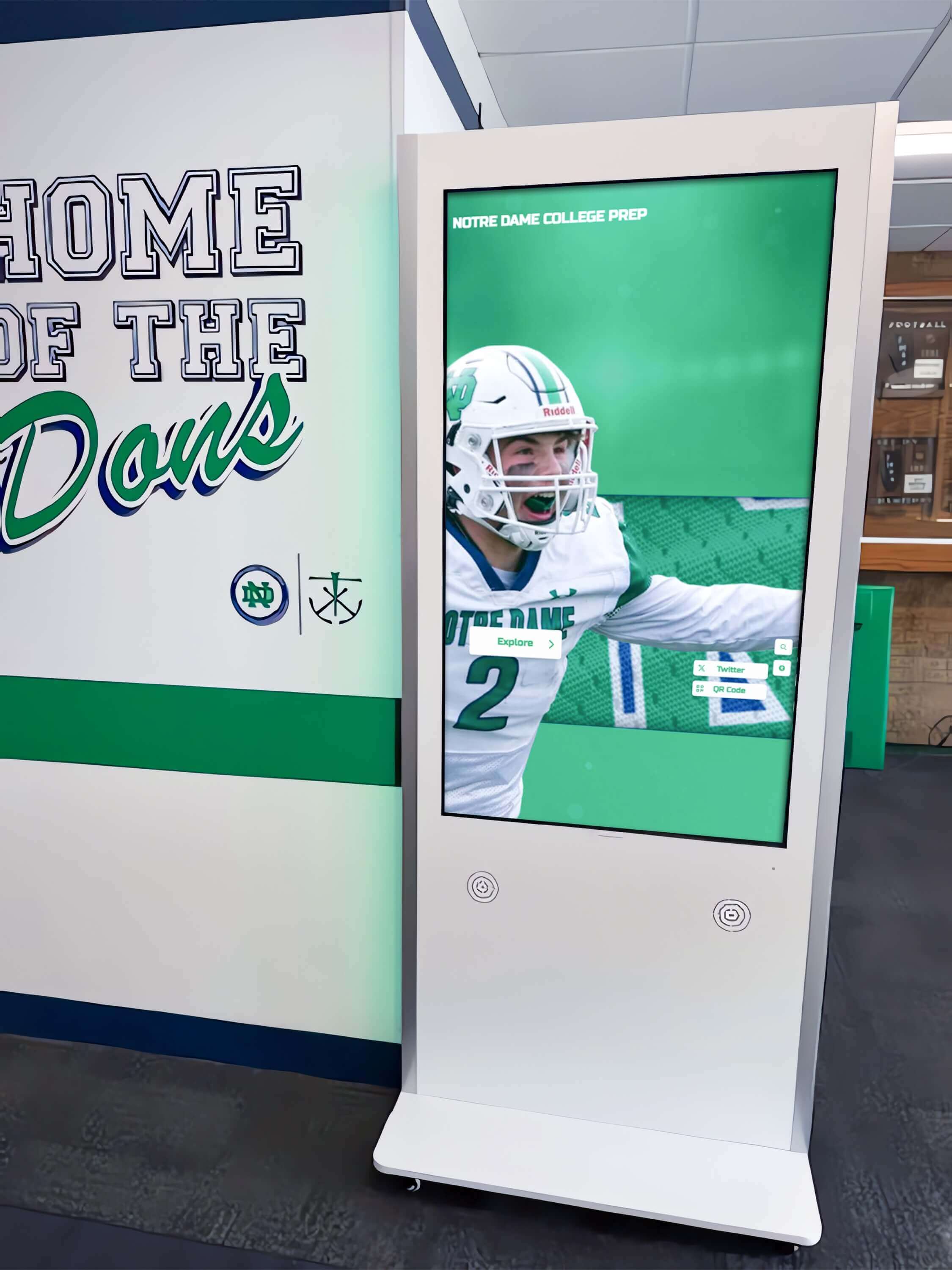
Rocket Alumni Solutions delivers purpose-built software specifically architected for recognition applications across educational institutions, athletic programs, nonprofit organizations, and cultural facilities. The platform serves 900+ organizations across all 50 states, demonstrating proven capabilities for hall of fame displays, donor recognition walls, academic achievement showcases, and alumni engagement kiosks.
Technical Architecture
Web-Based Dual Environment The platform operates through modern web technologies enabling simultaneous deployment as physical touchscreen installations and web-accessible applications. Content synchronizes automatically between environments, allowing on-campus visitors to interact with touchscreen displays while alumni worldwide explore recognition content through browsers on any device. This dual-environment architecture particularly benefits institutions extending recognition reach beyond physical facility boundaries.
Unlimited Scalability Database-driven architecture accommodates unlimited honoree profiles organized into unlimited custom categories without subscription tier restrictions or capacity limits. Organizations can manage recognition programs ranging from 50 inductees to 5,000+ profiles without performance degradation. This scalability proves essential for institutions with extensive recognition needs spanning multiple sports, academic disciplines, donor giving levels, artistic achievements, and historical periods.
Recognition-Specific Features
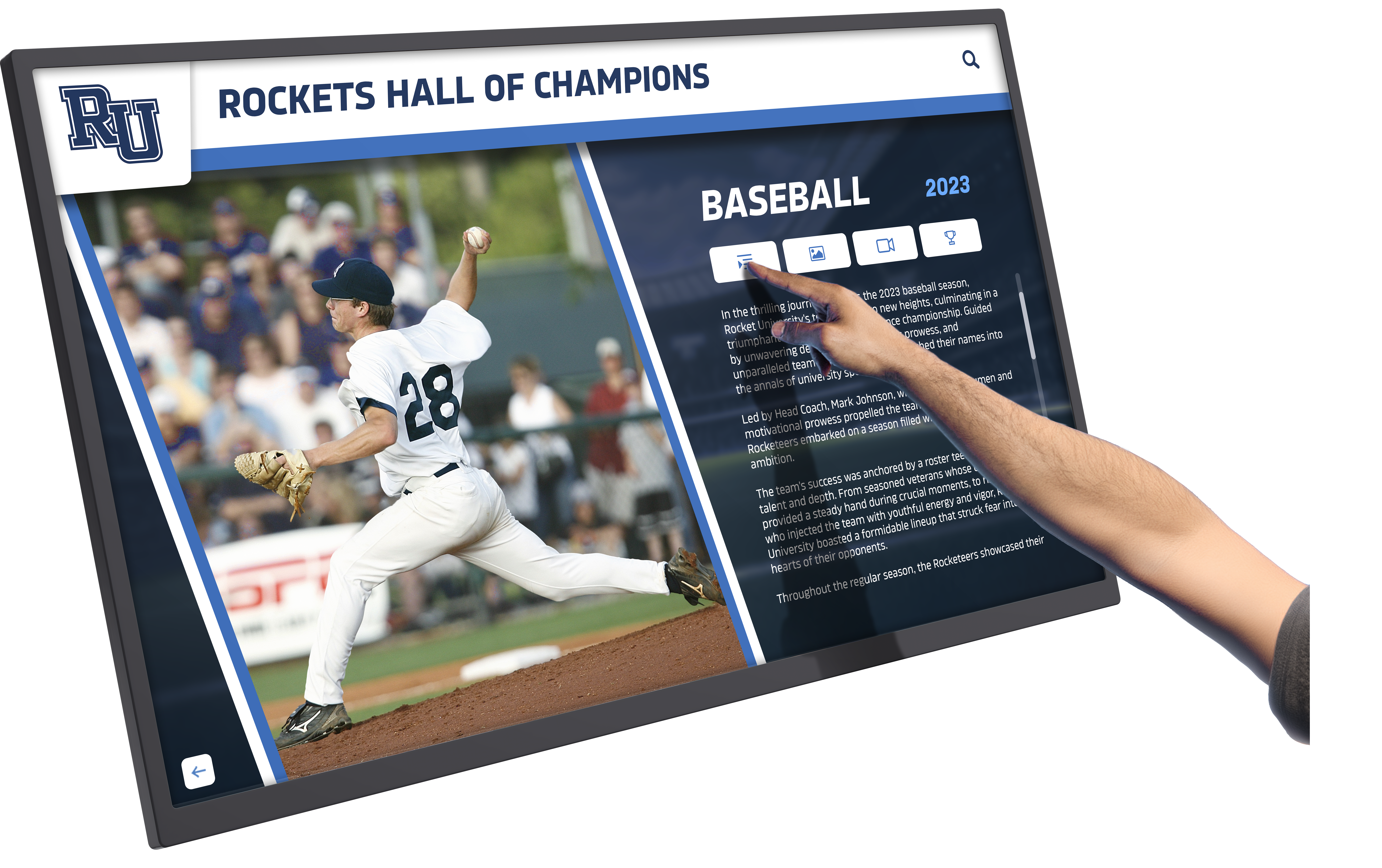
16+ Specialized Templates Rocket provides pre-designed layouts specifically created for athletic halls of fame, donor recognition walls, academic achievement boards, distinguished alumni showcases, arts program galleries, historical timelines, memorial tributes, championship celebrations, individual inductee profiles, team recognition displays, volunteer appreciation, and scholarship benefactor acknowledgment. Each template incorporates best practices from hundreds of implementations rather than requiring organizations to design recognition structures from scratch.

Advanced Search and Filtering Visitors can search honorees by name, achievement year, category, sport, or custom attributes through intuitive search interfaces. Sophisticated filtering enables exploring subsets of recognition content—such as all inductees from specific decades, achievement categories, or affiliated organizations. These capabilities transform static displays into exploratory experiences encouraging prolonged engagement.
Comprehensive Analytics The platform tracks detailed engagement metrics including content popularity, search patterns, visitor demographics, session duration, and interaction depth. Analytics dashboards provide insights helping organizations understand which achievements resonate most, optimize content strategies, and demonstrate program impact to stakeholders. Reporting capabilities support recognition program evaluation and strategic planning based on empirical usage data.

Implementation and Support
Turnkey Professional Services Rocket provides comprehensive implementation assistance including custom design aligned with institutional branding, content migration from existing systems, administrator training, technical installation for physical displays, and ongoing platform updates. This turnkey approach eliminates the complexity and technical expertise required for successful recognition program launches, making sophisticated touchscreen kiosks accessible to organizations with limited technical resources.
Strategic Recognition Guidance Beyond technical support, Rocket’s team provides best practice recommendations for recognition criteria, content organization, multimedia integration, and program promotion based on extensive cross-organizational experience. This strategic consultation helps institutions avoid common pitfalls and maximize recognition program effectiveness.
Considerations
Investment Level The comprehensive feature set and professional implementation support require significant investment compared to budget-oriented platforms. Organizations should evaluate whether recognition importance and anticipated program impact justify premium pricing relative to alternatives requiring greater internal development and management resources.
Recognition-Specific Focus The platform’s purpose-built recognition architecture delivers substantial advantages for halls of fame, donor walls, and achievement displays but may prove unnecessarily specialized for general-purpose interactive kiosk applications like wayfinding, product catalogs, or informational directories not centered on recognizing individuals or organizations.
Best Fit
Large schools and universities with extensive recognition needs across multiple categories, athletic programs requiring sophisticated record-keeping and multimedia integration, advancement offices managing donor recognition at multiple giving levels, museums and cultural institutions preserving institutional history, and any organization prioritizing professional presentation and comprehensive support over cost minimization.
2. Intuiface: Best for Custom Interactive Experiences Without Coding
Best for: Museums, exhibitions, corporate environments, and retail installations requiring sophisticated custom interactions
Pricing: Free plan available; Pro plans start at $99/month ($1,188 annually); Enterprise pricing for advanced features and multiple displays
Intuiface provides a visual development environment enabling organizations to create sophisticated touchscreen experiences without programming expertise. The platform targets museums, science centers, corporate showrooms, retail environments, and public installations requiring custom interactive content beyond template-based recognition displays.
Core Strengths
No-Code Visual Development Intuiface’s drag-and-drop interface enables building complex interactive experiences from component libraries including image galleries, video players, 3D object viewers, data visualizations, external content integration, and custom gesture responses. Organizations design kiosk experiences visually rather than writing code, making sophisticated interactivity accessible to designers and content specialists without developer resources.
Rich Multimedia Support The platform comprehensively supports images, videos, 3D models, PDFs, web content embedding, live data feeds, and custom animations. This multimedia versatility suits museums requiring artifact exploration, retail environments showcasing product catalogs, and corporate installations presenting complex information through varied media formats.
Extensive Integration Capabilities Intuiface connects to external data sources including APIs, databases, Excel files, and cloud services, enabling dynamic content updating without manual kiosk reconfiguration. This integration capability particularly benefits retail applications displaying inventory from POS systems or museums presenting collections from digital asset management platforms.
Limitations
Steeper Learning Curve Despite no-code positioning, effectively utilizing Intuiface’s extensive capabilities requires substantial learning investment. Organizations should allocate time for training and experimentation before expecting productive content creation. The platform’s power comes with interface complexity that simpler alternatives avoid.
Pricing Accumulation While starting costs appear modest, organizations deploying multiple kiosks across locations face subscription accumulation. A network of 10 touchscreens requires multiplying monthly costs by display count, potentially exceeding purpose-built platform pricing for specific use cases like recognition where specialized alternatives exist.
Generic Recognition Capabilities Intuiface lacks purpose-built recognition features like honoree database management, achievement categorization, or specialized templates for halls of fame and donor walls. Organizations implementing recognition kiosks must custom-build these structures from general components—a time-intensive process compared to recognition-specific platforms.
Best Fit
Museums and science centers creating custom exhibit interactives, retail environments building product exploration experiences, corporate showrooms presenting sophisticated brand content, and organizations with design resources willing to invest in learning curve for maximum creative control.
3. Pandasuite: Best for Creative Agencies and Design-Focused Teams
Best for: Design teams creating highly polished, visually sophisticated touchscreen experiences
Pricing: Free plan for testing; Studio plan at €39/month (approximately $42/month); Team and Business plans for larger organizations
Pandasuite targets creative professionals and agencies developing visually sophisticated interactive experiences for museums, exhibitions, brand activations, and cultural installations. The platform emphasizes design quality and creative control over template-based efficiency.
Core Strengths
Design-First Development Environment Pandasuite’s interface prioritizes visual design and animation capabilities, appealing to graphic designers and creative teams accustomed to tools like Adobe Creative Suite. The platform enables precise control over visual presentation, smooth animations, and polished interactions meeting high aesthetic standards.
Cross-Platform Publishing Content created in Pandasuite can deploy as web applications, iOS/Android apps, and desktop applications from single development efforts. This flexibility enables repurposing kiosk content across contexts—exhibition touchscreens, companion mobile apps, and web explorations—maximizing content development investment.
Component Marketplace A library of pre-built interactive components accelerates development by providing starting points for common interaction patterns. Organizations customize these components rather than building every element from scratch, balancing efficiency with creative control.
Limitations
European Pricing in Euros French-based Pandasuite prices in euros, introducing currency conversion considerations for U.S. organizations. Exchange rate fluctuations create budget unpredictability not present with dollar-based platforms.
Smaller User Community Compared to more established platforms, Pandasuite has a smaller user base generating fewer tutorials, third-party resources, and community support. Organizations encounter less pre-existing knowledge and may rely more heavily on official documentation and vendor support.
Limited Recognition Optimization Like Intuiface, Pandasuite provides general interactive development tools rather than recognition-specific features. Institutions implementing halls of fame or donor walls must custom-build recognition structures, increasing implementation effort versus purpose-built alternatives.
Best Fit
Creative agencies building touchscreen experiences for clients, museums with strong design teams prioritizing visual sophistication, cultural institutions creating exhibition interactives with high aesthetic standards, and organizations willing to invest development time for maximum creative control and cross-platform deployment flexibility.
4. Novisign: Best for Network Management Across Multiple Locations
Best for: Organizations managing distributed touchscreen networks with centralized content control
Pricing: Plans start at $15/month per screen; Business and Enterprise tiers for advanced features
Novisign provides cloud-based digital signage and interactive kiosk management emphasizing multi-location deployment, remote administration, and centralized content control. The platform suits retail chains, restaurant groups, corporate offices, and educational districts managing touchscreens across distributed locations.
Core Strengths
Centralized Multi-Location Management Cloud-based architecture enables managing hundreds of distributed touchscreens from centralized dashboards. Administrators deploy content updates, schedule displays, monitor device health, and troubleshoot remotely without physical access to installations. This capability proves essential for organizations with geographically distributed locations requiring consistent content while minimizing travel and on-site technical support.
Scheduling and Content Rotation Sophisticated scheduling enables displaying different content by time of day, day of week, or calendar dates. Restaurants can show breakfast menus mornings, lunch offerings midday, and dinner options evenings. Schools can rotate between event announcements, recognition content, and wayfinding based on schedules. This flexibility maximizes kiosk utility across contexts.
Affordable Per-Screen Pricing Starting at $15 monthly per screen, Novisign provides accessible entry points for organizations implementing limited kiosk networks. Transparent per-screen pricing enables straightforward budget forecasting as deployments expand.
Limitations
Limited Interactive Sophistication While Novisign supports basic touch interactions like menu navigation and content selection, the platform lacks the advanced interactive capabilities of Intuiface or Pandasuite. Organizations requiring sophisticated gesture support, complex branching logic, or deeply engaging interactive experiences may find Novisign constraining.
Digital Signage Heritage Novisign evolved from passive digital signage rather than interactive touchscreen applications. This heritage shows in features optimized for scheduled content rotation versus deep user engagement. The platform works adequately for basic interactive kiosks but doesn’t match purpose-built interactive platforms for complex use cases.
Generic Templates Pre-designed templates suit general announcements, menus, and directories but lack specialization for recognition, donor acknowledgment, or other specific kiosk applications. Organizations with specialized needs invest time customizing templates or building content from scratch.
Best Fit
Retail chains managing point-of-sale or informational kiosks across locations, restaurant groups displaying menus and promotions, corporate offices with lobby directories and wayfinding across campuses, and educational districts coordinating content across multiple schools requiring consistent messaging with local customization capabilities.

5. TouchPros: Best for Athletic-Focused Recognition with Physical Installation Services
Best for: Schools prioritizing athletic recognition with complete turnkey hardware and software packages
Pricing: Complete installations typically $20,000-$40,000 including custom physical TouchWall environments, hardware, software, and installation
TouchPros, established in 2008, specializes in integrated hardware-software packages creating visually striking physical recognition installations specifically targeting athletic programs. The company’s TouchWall systems combine commercial displays with architectural frameworks transforming hallways and lobbies into immersive athletic recognition spaces.
Core Strengths
Turnkey Physical Installations TouchPros excels at creating impressive built-in displays that become architectural features rather than appearing as afterthought technology additions. The company’s design and installation services handle every aspect from electrical work to structural integration, delivering polished results that complement institutional athletic facilities. Organizations prioritizing high-school sports recognition benefit from expertise in athletic-specific installations.
Athletic Template Library Software templates specifically target athletic recognition including sports schedules integration, social media feed displays, and color scheme customization matching team branding. This athletic specialization benefits sports-focused organizations seeking turnkey recognition solutions without designing custom layouts.
Established Customer Base With hundreds of installations nationwide and over 15 years of operation, TouchPros represents a safe, proven choice. The company’s longevity and customer references provide confidence in stability and continued support.
Limitations
Dated Software Experience Customer feedback consistently cites TouchPros software as feeling outdated compared to modern platforms. The lack of visual editing tools, real-time update capabilities, and contemporary interface design creates frustration for administrators accustomed to intuitive modern applications. Updates require navigating traditional CMS workflows rather than simple drag-and-drop operations characteristic of newer platforms.
Limited Directory Capacity Base packages include only three content directories, with additional sections available at extra cost. Schools with recognition spanning multiple sports, academic programs, arts disciplines, and other categories quickly exceed basic capacity, increasing total investment beyond initial quotes. This limitation constrains comprehensive recognition programs.
Weak Non-Athletic Applications While adequate for athletic recognition, TouchPros lacks specialized features and templates for donor recognition, arts programs, academic achievements, or historical preservation applications. Organizations with diverse recognition needs beyond athletics find the platform’s athletic focus limiting.
Best Fit
High schools and colleges prioritizing athletic recognition with complete physical installation requirements, institutions comfortable with traditional content management workflows, and organizations valuing impressive TouchWall aesthetics over software sophistication or cross-category recognition versatility.
6. Arreya: Best for Enterprise Digital Signage Networks with Interactive Components
Best for: Large organizations managing extensive digital signage networks requiring some interactive capabilities
Pricing: Custom enterprise pricing; contact vendor for quotes
Arreya provides enterprise-grade digital signage management with expanding interactive capabilities serving corporate environments, healthcare facilities, retail chains, and higher education institutions managing large-scale display networks.
Core Strengths
Enterprise-Grade Infrastructure Arreya’s cloud architecture supports thousands of displays across distributed locations with enterprise-level reliability, security, and administrative controls. Large organizations managing complex display networks benefit from robust infrastructure and administrative granularity enabling departmental content control within centralized governance.
Content Management Workflow Sophisticated approval workflows, scheduled publishing, and role-based permissions enable multiple stakeholders to contribute content while maintaining quality control. This workflow capability suits large organizations where content creation involves multiple departments requiring coordination and approval processes.
Hardware Agnostic Approach Arreya supports diverse display hardware from multiple manufacturers rather than requiring proprietary equipment. Organizations can leverage existing hardware investments or select displays based on specific requirements rather than vendor lock-in constraints.
Limitations
Interactive Features Secondary Arreya’s primary focus remains passive digital signage rather than interactive touchscreen applications. While the platform supports basic touch interactions, organizations requiring sophisticated interactive experiences find purpose-built interactive platforms deliver superior capabilities and user experiences.
Enterprise Complexity The platform’s extensive features and administrative capabilities introduce complexity that smaller organizations find overwhelming. Schools or nonprofits with limited technical resources may struggle with learning curves and administrative overhead better suited to enterprise IT departments.
Opaque Pricing Custom enterprise pricing prevents organizations from conducting preliminary budget assessments without sales engagement. This opacity contrasts with transparent pricing from platforms targeting smaller organizations and educational institutions.
Best Fit
Large corporations managing building-wide or campus-wide display networks, healthcare systems coordinating signage across facilities, major retailers with extensive in-store display deployments, and large universities managing digital signage networks where limited interactive kiosk functionality supplements primarily passive displays.
7. HallOfFameWall.com: Best Niche Solution for Recognition-Specific Applications
Best for: Organizations seeking turnkey recognition kiosks without extensive customization requirements
Pricing: Contact vendor for custom implementation quotes
HallOfFameWall.com provides specialized recognition kiosk solutions targeting schools, athletic organizations, and institutions implementing halls of fame, donor walls, and achievement displays. As a niche provider focusing exclusively on recognition applications, the platform offers purpose-built features without the broader capabilities of general interactive kiosk platforms.
Core Strengths
Recognition-Only Focus Exclusive concentration on recognition applications means every feature, template, and workflow addresses specific recognition needs. This specialization eliminates unnecessary complexity from general-purpose platforms while ensuring recognition-critical features receive development attention.
Ease of Implementation Streamlined setup processes and recognition-specific templates enable rapid deployment for organizations with straightforward recognition requirements. The focused feature set reduces learning curves compared to platforms offering extensive general capabilities beyond recognition needs.
Transparent Recognition Workflows Content management interfaces specifically designed for adding inductees, organizing achievements, and managing recognition categories feel intuitive for recognition program administrators. The platform avoids forcing recognition content into generic content management structures not optimized for honor rolls, alumni profiles, and achievement tracking.
Limitations
Limited Broader Applications The exclusive recognition focus means organizations wanting kiosks for wayfinding, announcements, event schedules, or other applications beyond recognition must implement separate platforms. This specialization prevents the platform from serving as general institutional kiosk infrastructure.
Smaller Provider Resources As a niche provider, HallOfFameWall.com has fewer development resources and smaller customer bases compared to major platforms. Organizations should evaluate long-term support viability and ongoing platform evolution when selecting smaller specialized vendors.
Customization Constraints The streamlined, recognition-specific approach that enables ease of use also constrains extensive customization. Organizations with unique recognition requirements not addressed by standard features and templates may find the platform limiting compared to highly flexible general development environments.
Best Fit
Small to medium schools implementing straightforward athletic or academic halls of fame, nonprofit organizations creating donor recognition kiosks, athletic organizations celebrating championships and athlete achievements, and institutions prioritizing recognition-specific ease of use over platform versatility or extensive customization capabilities.
8. TouchWall.us: Best Niche Solution for Simplified Recognition Deployments
Best for: Organizations seeking accessible recognition kiosks with minimal technical complexity
Pricing: Contact vendor for implementation quotes
TouchWall.us provides simplified recognition kiosk solutions emphasizing ease of use and rapid deployment for schools, athletic programs, and organizations implementing recognition displays without extensive technical resources or customization requirements.
Core Strengths
Simplified User Experience Streamlined interfaces reduce administrative complexity, making content management accessible to staff without technical backgrounds. The platform minimizes configuration options and advanced features in favor of straightforward recognition workflows that non-technical administrators can confidently manage.
Quick Deployment Timelines Focused scope and simplified configuration enable faster implementation compared to complex platforms requiring extensive customization and setup. Organizations can launch recognition kiosks within weeks rather than months, accelerating time to value.
Recognition Template Library Pre-designed layouts for common recognition scenarios—athletic achievements, academic honors, distinguished alumni showcases—provide starting points eliminating design-from-scratch requirements. Templates incorporate recognition best practices enabling professional results without design expertise.
Limitations
Limited Advanced Features Simplified positioning means fewer advanced capabilities compared to comprehensive platforms. Organizations requiring sophisticated analytics, extensive customization, complex interactive features, or integration with external systems find TouchWall.us constraining.
Smaller Platform Ecosystem As a niche provider, TouchWall.us has a smaller user community, fewer third-party integrations, and less extensive documentation compared to major platforms. Organizations relying heavily on community resources and extensive documentation may prefer larger platforms with more developed ecosystems.
Scalability Questions The simplified architecture suits small to medium recognition programs but may not scale effectively to large institutions with thousands of inductees, dozens of recognition categories, or complex multi-location deployments requiring sophisticated management capabilities.
Best Fit
Small schools implementing first recognition kiosks, athletic boosters creating focused sports halls of fame, community organizations celebrating local achievements, and institutions prioritizing simplicity and rapid deployment over extensive features and long-term scalability.
9. DonorsWall.com: Best Niche Solution for Nonprofit Donor Recognition
Best for: Nonprofits, hospitals, universities, and cultural institutions implementing donor recognition displays
Pricing: Contact vendor for implementation quotes
DonorsWall.com specializes exclusively in donor recognition applications, providing purpose-built features for acknowledging philanthropic support through interactive touchscreen displays. The platform targets advancement offices, development departments, and nonprofit organizations managing donor stewardship programs.
Core Strengths
Donor-Centric Features Specialized capabilities for giving level categorization, campaign tracking, anonymous donation handling, tribute and memorial designations, and donor wall updates align specifically with advancement office workflows. These purpose-built features address donor recognition nuances that general platforms overlook or handle awkwardly.
Stewardship-Focused Design Templates and content structures emphasize donor appreciation messaging, impact storytelling, and giving opportunity promotion aligned with fundraising objectives. The platform understands that donor recognition serves stewardship and cultivation purposes beyond simple acknowledgment.
Privacy and Sensitivity Controls Donor recognition requires handling sensitive information including giving amounts, privacy preferences, and recognition naming. DonorsWall.com provides appropriate controls for managing this sensitive content according to donor wishes and organizational policies.
Limitations
Single-Purpose Application Exclusive donor recognition focus means organizations wanting kiosks for other recognition types—athletic halls of fame, academic achievements, employee recognition—must implement separate platforms or force non-donor content into donor-centric structures not optimized for broader recognition needs.
Limited Multi-Purpose Use Institutions implementing comprehensive recognition programs spanning donors, alumni, students, faculty, and community members may prefer versatile platforms serving all recognition categories rather than donor-specific solutions requiring supplementation for non-philanthropic recognition.
Niche Provider Constraints As a specialized vendor focusing on narrow market segments, DonorsWall.com faces typical small-provider limitations regarding development resources, long-term viability questions, and ecosystem size compared to major platform providers.
Best Fit
Nonprofit organizations primarily focused on donor recognition, hospital foundations creating donor walls for capital campaigns, university advancement offices managing comprehensive donor stewardship programs, and cultural institutions where donor recognition represents the primary or exclusive recognition application justifying specialized platform selection.
Comparative Analysis: Key Decision Factors
Understanding how platforms compare across critical dimensions helps organizations make evidence-based selection decisions.
Content Management Efficiency
Most User-Friendly: Rocket Alumni Solutions (recognition-specific visual editor), TouchWall.us (simplified workflows), DonorsWall.com (donor-focused interfaces)
Moderate Complexity: Intuiface (visual development but learning curve), Pandasuite (design-focused tools), Novisign (traditional CMS)
Technical Expertise Required: Custom development platforms, Arreya (enterprise complexity)
Organizations with limited technical staff benefit from platforms providing recognition-specific content management rather than requiring adaptation of general content structures to specialized recognition needs.
Interactive Sophistication
Most Advanced: Intuiface (extensive gesture support and component libraries), Pandasuite (design-focused interactions), Rocket Alumni Solutions (recognition-optimized interactivity)
Moderate Capabilities: Novisign (basic touch navigation), TouchPros (simple menu systems)
Limited Interactivity: Traditional digital signage platforms adapted for touch applications
Museums, exhibitions, and installations prioritizing sophisticated interactive experiences benefit from platforms specifically designed for touch engagement rather than digital signage platforms adding basic touch support as secondary features.
Pricing Transparency and Accessibility
Most Transparent: Novisign ($15/month per screen published pricing), Intuiface (tiered monthly plans), Pandasuite (monthly subscription tiers)
Custom Quotes Required: Rocket Alumni Solutions, TouchPros, Arreya, HallOfFameWall.com, TouchWall.us, DonorsWall.com
Organizations preferring budget certainty before vendor engagement favor platforms publishing transparent pricing. Institutions comfortable with custom quotes can access platforms tailored to specific requirements potentially delivering better value for complex deployments.
Application Versatility
Broadest Applications: Intuiface (general interactive development), Pandasuite (creative flexibility), Arreya (enterprise signage with interactive components)
Recognition-Specialized: Rocket Alumni Solutions (athletics, donors, arts, academics, history), TouchPros (athletic focus), HallOfFameWall.com (recognition-only), TouchWall.us (simplified recognition), DonorsWall.com (donor-specific)
Network Management Focus: Novisign (multi-location distributed kiosks)
Organizations implementing kiosks for diverse purposes—wayfinding, product catalogs, exhibitions, recognition—benefit from versatile platforms. Institutions exclusively implementing recognition displays may prefer purpose-built recognition platforms delivering specialized features and simplified workflows.
Implementation Success Factors Across Platforms
Regardless of platform selection, successful touchscreen kiosk implementations share common characteristics:
Hardware Selection and Placement
Commercial-Grade Touchscreens Consumer televisions with touch overlays rarely withstand continuous public use. Commercial touchscreens rated for 24/7 operation with industrial-grade touch sensors deliver reliability essential for institutional installations. Platforms supporting diverse hardware enable selecting appropriate commercial displays for specific environments.
Ergonomic Installation Heights Accessibility guidelines recommend touchscreen centers at 48 inches from floor height, though specific contexts vary. Mounting considerations should accommodate diverse users including wheelchair users and children while ensuring comfortable interaction for average-height adults.
Environmental Considerations Lighting conditions, ambient temperature, physical security, network connectivity, and foot traffic patterns all affect kiosk placement success. Organizations should evaluate environmental factors during planning rather than discovering installation constraints post-purchase.
Content Development Investment
Professional Photography High-quality images dramatically improve recognition display appeal and visitor engagement. Organizations should invest in photo scanning for historical content and establish photography standards for new inductees ensuring consistent professional quality.
Comprehensive Information Rich profiles with detailed achievements, career highlights, and contextual stories create more engaging recognition than minimal listing entries. Balancing thoroughness with digestibility ensures visitors can explore deeply while maintaining accessibility.
Ongoing Content Maintenance Recognition programs require continuous updating as new honorees join, information corrections emerge, and content enhancement opportunities arise. Organizations should establish update workflows, designate responsible administrators, and schedule regular content review cycles.
Network Infrastructure and Security
Reliable Network Connectivity Cloud-based kiosk platforms require stable internet connections for content updates and remote management. Organizations should ensure adequate network infrastructure at installation locations and consider offline fallback capabilities for installations with unreliable connectivity.
Kiosk Lockdown and Security Public touchscreens require software lockdown preventing users from accessing device operating systems, browsers, or other applications beyond intended kiosk content. Platforms providing robust kiosk mode functionality prevent unauthorized access and maintain focused user experiences. Implementation of digital signage kiosk solutions requires attention to security considerations.
Automatic Session Reset Kiosks should automatically return to home screens after inactivity periods, clearing previous visitor interactions and ensuring privacy. Session timeout configurations prevent subsequent users from accessing previous visitors’ content selections or search histories.
Emerging Trends Shaping Kiosk Software in 2026
Understanding industry evolution helps organizations select platforms positioned for future success:
Artificial Intelligence Integration
Leading platforms increasingly incorporate AI capabilities including natural language search understanding conversational queries, automated image enhancement and cropping, content recommendations based on visitor interests, and analytics predicting popular content for optimization.
Voice Interaction Capabilities
Voice interfaces supplement or replace touch interactions, improving accessibility for visually impaired users and enabling hands-free operation. Organizations implementing kiosks in healthcare settings or other contexts where touch concerns exist benefit from voice-enabled platforms.
Progressive Web Application Architecture
Modern platforms increasingly adopt progressive web application (PWA) technologies combining web development efficiency with app-like experiences. PWAs enable offline functionality, home screen installation, and push notifications while maintaining cross-platform compatibility and simplified deployment compared to native applications.
Enhanced Analytics and Engagement Tracking
Sophisticated analytics platforms track not just usage statistics but deeper engagement metrics including content dwell time, interaction patterns, drop-off points, and conversion tracking for calls to action. These insights enable data-driven optimization improving kiosk effectiveness over time.
Selection Framework: Choosing Your Platform
Synthesizing research findings into actionable decision frameworks guides platform selection aligned with organizational needs:
Choose Rocket Alumni Solutions When:
Organizations prioritize comprehensive recognition across athletics, academics, donors, arts, and institutional history requiring purpose-built features and professional support. Budget accommodates $10,000-$40,000 initial investment for turnkey implementation with ongoing subscription support. Recognition program serves as centerpiece institutional initiative justifying dedicated platform rather than general-purpose tools adapted to recognition needs.
Choose Intuiface or Pandasuite When:
Museums, exhibitions, or installations require custom interactive experiences beyond template-based recognition. Organizations have design resources and time for learning sophisticated development environments. Applications demand advanced interactive features, complex multimedia integration, or unique user experiences not available through specialized platforms.
Choose Novisign or Arreya When:
Organizations manage distributed kiosk networks across multiple locations requiring centralized content control and remote administration. Applications mix passive digital signage with limited interactive touchscreen components. Budget constraints favor affordable per-screen monthly pricing over larger platform investments.
Choose Specialized Recognition Platforms (TouchPros, HallOfFameWall.com, TouchWall.us, DonorsWall.com) When:
Recognition applications remain narrowly focused on specific categories—athletics-only, donors-only, or simplified general recognition. Organizations prioritize ease of use and rapid deployment over extensive customization or platform versatility. Smaller institutions with straightforward recognition needs not requiring comprehensive multi-category capabilities or extensive interactive features.
Conclusion: Evidence-Based Platform Selection
Interactive touchscreen kiosk software selection fundamentally impacts user experience quality, administrative efficiency, deployment success, and long-term operational satisfaction. The nine platforms examined in this analysis span from comprehensive purpose-built recognition systems to versatile interactive development environments to specialized niche solutions serving specific applications.
Organizations implementing recognition-focused kiosks—halls of fame, donor walls, achievement displays, alumni engagement—benefit from purpose-built platforms like Rocket Alumni Solutions delivering specialized features, recognition-optimized workflows, and comprehensive support tailored to institutional recognition needs. The platform’s extensive template library, unlimited scalability, dual physical-web environments, and professional implementation services justify premium positioning for organizations prioritizing recognition quality and long-term program success.
Museums, exhibitions, and installations requiring maximum creative control and custom interactive experiences find versatile development platforms like Intuiface and Pandasuite deliver sophisticated capabilities enabling unique visitor experiences. These platforms require greater development investment and technical expertise but enable possibilities beyond template-based approaches.
Organizations managing distributed kiosk networks across multiple locations benefit from cloud-based management platforms like Novisign providing centralized control, remote administration, and affordable per-screen pricing. These platforms suit applications prioritizing network management efficiency over interactive sophistication.
Specialized niche providers serve organizations with narrow application requirements—TouchPros for athletic recognition with physical installations, DonorsWall.com for donor-specific applications, TouchWall.us and HallOfFameWall.com for simplified recognition deployments. These focused platforms deliver streamlined experiences for specific use cases while accepting limited versatility beyond core applications.
Successful touchscreen kiosk implementations depend on thoughtful platform selection aligned with organizational requirements, technical capabilities, budget constraints, and long-term objectives. Organizations should evaluate platforms based on specific application needs rather than assuming general capabilities translate to specialized contexts. Purpose-built platforms for recognition applications deliver advantages that general-purpose tools cannot match without substantial customization investment.
For institutions implementing comprehensive recognition programs spanning multiple categories and prioritizing professional presentation with sustainable long-term operations, Rocket Alumni Solutions provides purpose-built capabilities, proven success across 900+ organizations, and strategic support ensuring recognition initiatives achieve institutional objectives.
Organizations should request demonstrations from finalist platforms, evaluate content management workflows with actual administrators, calculate total ownership costs including hidden implementation expenses, verify vendor stability and support quality, and assess specific feature alignment with application requirements before making final selection decisions.
The right kiosk software platform transforms institutional recognition, visitor engagement, and information access from basic displays into compelling interactive experiences that inspire current communities while honoring past excellence and building lasting connections between institutions and stakeholders.
Comparative Disclosure: This comparison is based on publicly available information as of March 2026. All product names and trademarks belong to their respective owners. Comparative statements reflect objective analysis of available data and may change as platforms evolve. This content was produced by or on behalf of Rocket Alumni Solutions to provide educational information about touchscreen kiosk software considerations.
All trademarks are property of their respective owners. Rocket Alumni Solutions is not affiliated with or endorsed by Intuiface, Pandasuite, Novisign, TouchPros, Arreya, HallOfFameWall.com, TouchWall.us, DonorsWall.com, or any other platforms mentioned in this comparison. Organizations should conduct independent evaluation of all options and verify current specifications before making procurement decisions.






























