




Digital signage screens and interactive kiosks represent powerful communication channels, but many organizations struggle to generate engaging content that sustains viewer attention and delivers measurable value. Empty screens cycling through generic announcements waste both technology investment and audience attention.
This comprehensive guide provides 120 proven content ideas specifically designed for digital signage screens and interactive kiosks across educational institutions, corporate environments, healthcare facilities, retail locations, and public spaces. Each category includes practical implementation approaches with considerations for content freshness, technical requirements, and audience engagement.
Organizations that deploy digital signage without comprehensive content strategies quickly exhaust their initial ideas. Screens begin displaying repetitive announcements, outdated information, or filler content that viewers learn to ignore. According to research from the Digital Signage Federation, displays showing dynamic, regularly updated content generate 63% higher engagement rates compared to static or rarely-updated screens.
The challenge extends beyond simply generating ideas—successful digital signage requires understanding which content types work for specific environments, how frequently different content should update, and which formats deliver the strongest engagement. Educational institutions face different content requirements than corporate lobbies, while interactive kiosks demand different approaches than passive display screens.
This guide organizes 120 content ideas into strategic categories aligned with common organizational objectives and environments. Whether you’re launching new digital signage installations or refreshing stagnant content on existing screens, these ideas provide actionable starting points adaptable to your specific context.

Recognition and Achievement Content (Ideas 1-20)
Recognition content transforms digital signage into celebration platforms that strengthen culture, motivate individuals, and demonstrate organizational values. These ideas work particularly well in educational institutions, corporate environments, and membership organizations.
Student and Employee Recognition
1. Student of the Month/Week Profiles: Feature detailed profiles including photos, achievements, quotes, and background information. Update weekly or monthly to maintain freshness and create anticipation around who will be featured next.
2. Academic Honor Roll Displays: Showcase students meeting grade point average thresholds, organized by academic level or achievement tier. Academic recognition programs demonstrate the impact of visible achievement celebration on student motivation.
3. Perfect Attendance Recognition: Celebrate students or employees maintaining consistent attendance records. Include individual photos and running statistics showing attendance streaks.
4. Employee Milestone Celebrations: Recognize work anniversaries, promotions, certifications earned, and professional achievements. Include tenure milestones (5, 10, 15+ years) with historical photos showing the individual’s journey.
5. Test Score Achievements: Display students achieving exceptional standardized test results, AP exam scores, or certification completions without disclosing specific scores (maintain privacy while celebrating achievement).
6. Scholarship Recipients: Feature students awarded academic, athletic, or community scholarships. Include scholarship details, award amounts, and student plans for their education.
7. Teacher/Staff Appreciation Spotlights: Rotate through staff members with profiles highlighting their contributions, background, and what makes them valuable to the organization. Teacher appreciation recognition strengthens workplace culture and morale.
8. Peer Recognition Submissions: Allow staff or students to nominate colleagues for recognition, with approved submissions appearing on displays. Creates culture of appreciation and peer acknowledgment.
9. Birthday Recognition Board: Display upcoming birthdays for students or employees. Include photos and fun facts to personalize recognition while respecting privacy preferences.
10. New Student/Employee Welcome Screens: Introduce new community members with photos, backgrounds, interests, and fun facts. Helps new members feel welcomed while enabling others to connect.
Athletic and Competition Recognition
11. Athlete of the Week Features: Showcase standout athletic performances with statistics, game highlights, photos, and quotes from coaches or the athletes themselves.
12. Team Roster Displays: Present current team rosters with player photos, positions, jersey numbers, and brief biographical information. Update throughout seasons as rosters change.
13. Game Schedule and Results: Display upcoming athletic competitions with dates, times, locations, and opponent information. Follow up with game results, scores, and performance highlights.
14. Championship and Tournament Recognition: Celebrate team and individual championship achievements with photos, final statistics, season highlights, and roster information.
15. Record Breakers and Milestone Achievements: Feature athletes breaking school records or achieving significant milestones (1,000 points scored, 100 career wins, etc.). Include historical context showing previous record holders.
16. Recruitment Signing Day Celebrations: Announce student-athletes committing to collegiate programs with commitment details, school information, and future plans.
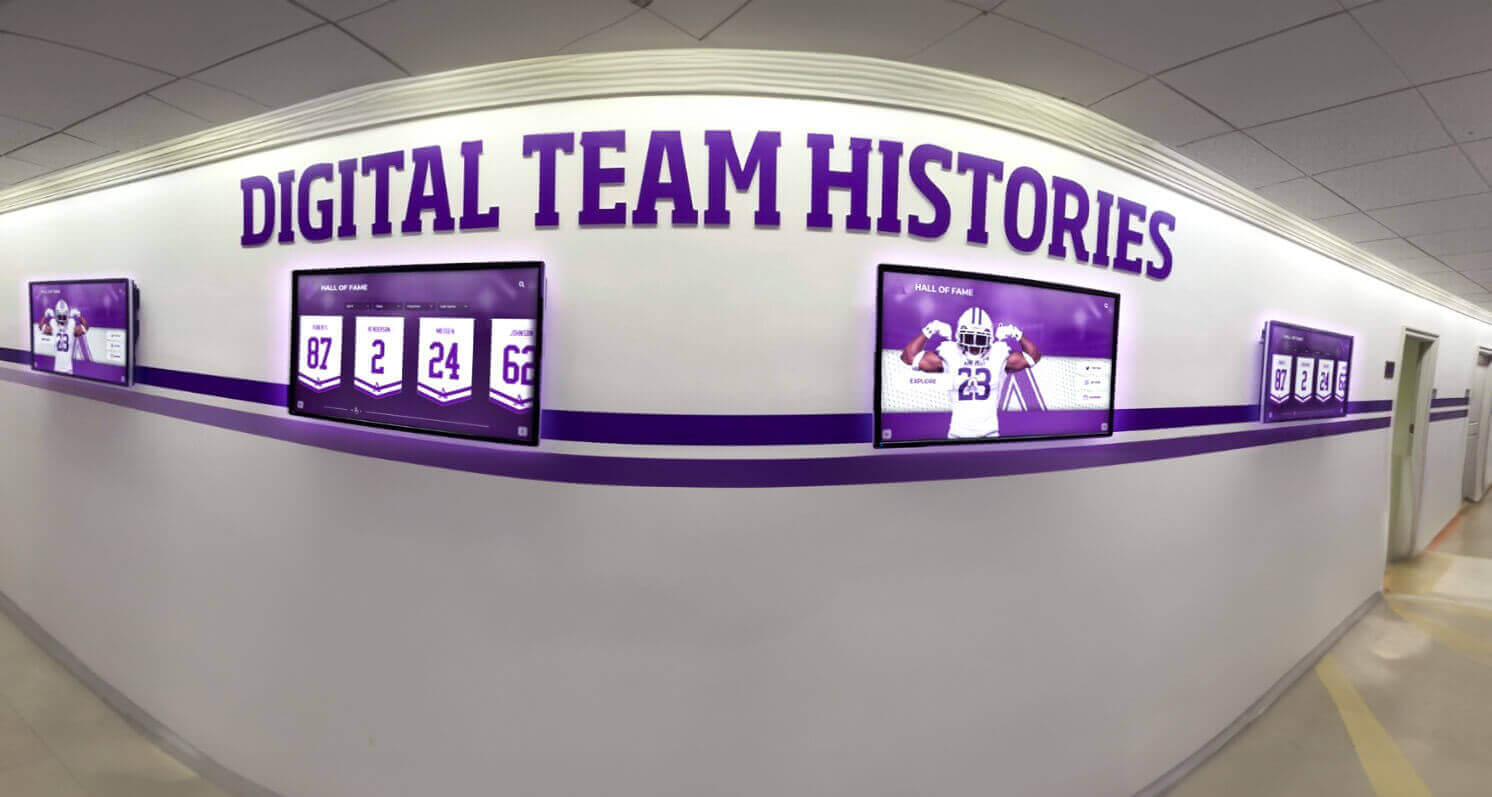
17. Athletic Hall of Fame Profiles: Showcase athletic hall of fame inductees with career highlights, achievements, and where they are now.
18. Competition Results from Academic Teams: Display results from debate competitions, robotics tournaments, academic bowl matches, science olympiads, and other competitive academic programs.
19. All-Conference and All-State Recognition: Celebrate athletes earning conference, regional, or state recognition with achievement details and selection criteria.
20. Senior Night Tributes: During senior recognition periods, feature graduating athletes with career highlights, memorable moments, post-graduation plans, and thank-you messages to coaches, teammates, and supporters.

Informational and Educational Content (Ideas 21-40)
Educational content transforms digital signage into learning tools that inform, educate, and provide valuable reference information viewers actively seek.
Daily Operations and Announcements
21. Daily Announcements and Bulletin Board: Replace traditional PA announcements with visual displays showing the day’s important information, schedule changes, and reminders.
22. Cafeteria Menus and Nutritional Information: Display daily meal options with nutritional details, allergen warnings, and pricing. Update menus daily or weekly based on food service schedules.
23. Bell Schedules and Period Transitions: Show current period, time remaining, and upcoming schedule changes. Particularly valuable during modified schedules for testing, assemblies, or special events.
24. Campus Maps and Wayfinding: Interactive kiosks provide building layouts, room locations, department directories, and navigation assistance. Especially valuable for visitors and new students.
25. Upcoming Events Calendar: Display comprehensive calendars showing athletics, performances, meetings, deadlines, holidays, and community events. Filter by category or department for targeted information.
26. Weather Forecasts and Alerts: Show local weather conditions, forecasts, and severe weather alerts. Include extended forecasts helping students and staff plan accordingly.
27. Daily Inspirational Quotes: Rotate through motivational quotes, historical facts, or educational tidbits aligned with organizational values. Changes daily to maintain interest.
28. Countdown Timers for Major Events: Build anticipation for significant events like homecoming, graduation, final exams, or school breaks with countdown displays.
29. Lost and Found Notifications: Post photos and descriptions of lost and found items to help reunite owners with belongings. Update as items are turned in or claimed.
30. Emergency Procedures and Safety Information: Display evacuation routes, emergency contact numbers, and safety protocols. Rotates as background content but becomes primary during actual emergencies.
Educational and Learning Content
31. Daily Trivia Questions: Pose questions related to curriculum topics, school history, or general knowledge. Reveal answers periodically to encourage return viewing.
32. Word of the Day: Display vocabulary words with definitions, usage examples, and etymology. Builds language skills through consistent exposure.
33. This Day in History: Feature historical events occurring on the current date with context and significance. Connects learning to the present day.
34. Science Facts and Experiments: Share scientific concepts, interesting phenomena, or simple experiments viewers can replicate. Includes visual demonstrations when possible.
35. Math Problems of the Day: Pose grade-appropriate mathematics challenges with solutions appearing later in the day. Encourages mathematical thinking and problem-solving.
36. Foreign Language Phrases: Display common phrases in foreign languages taught at the institution with translations and pronunciation guides. Reinforces language learning beyond the classroom.
37. Book Recommendations and Reviews: Feature library holdings, recent acquisitions, or staff recommendations with cover images and brief descriptions. Links to library catalog when accessible.
38. College and Career Information: Display information about college fairs, career exploration resources, scholarship opportunities, and post-graduation planning resources.
39. Test Preparation Tips and Resources: Share study strategies, test-taking techniques, and resources available for standardized test preparation during relevant seasons.
40. Historical Timelines: Present institutional history through visual timelines showing founding, major milestones, facility expansion, notable alumni, and program development. School historical timeline displays preserve legacy while educating current communities.
Alumni and Community Engagement (Ideas 41-55)
Alumni and community content strengthens connections beyond current membership, building lifelong relationships and expanding organizational reach.
Alumni Connection and Networking
41. Alumni Spotlight Features: Profile successful alumni with career information, life updates, and connections to their institutional experiences. Rotate through diverse graduates across various fields and graduation years.
42. “Where Are They Now” Alumni Updates: Feature recent graduates with updates on college choices, careers, military service, or other post-graduation paths. Alumni where are they now programs maintain engagement with recent graduates.
43. Alumni Achievements and Awards: Celebrate alumni receiving professional recognition, publishing books, earning advanced degrees, or achieving notable accomplishments.
44. Alumni Career Panels and Speaker Series: Promote upcoming alumni events, career panels, networking opportunities, and speaking engagements. Include speaker bios and registration information.
45. Alumni Association Updates: Share news from alumni organizations including event recaps, membership benefits, reunion planning, and ways to stay involved.
46. Class Reunion Information: Promote upcoming reunions with dates, venues, registration details, and historical photos from the graduating class being celebrated.
47. Alumni Social Media Highlights: Curate and display alumni social media posts (with permission) showing institutional pride, accomplishments, or memories being shared online.
48. Alumni Giving Recognition: Acknowledge alumni donors supporting the institution with appropriate recognition while respecting privacy preferences. Display aggregate giving statistics showing alumni support impact.
49. Notable Alumni History: Create historical profiles of distinguished alumni from earlier eras, preserving institutional legacy and demonstrating long-term impact.
50. Alumni Business Directory: Showcase businesses owned by alumni, creating networking opportunities while supporting alumni entrepreneurship.
Community Connection and Outreach
51. Community Partnership Highlights: Feature local businesses, organizations, and community partners supporting the institution. Include partnership details and mutual benefits.
52. Volunteer Opportunities: Promote service opportunities available to students, staff, and community members. Include organization details, time commitments, and how to get involved.
53. Community Event Calendars: Display local events, festivals, government meetings, and community activities. Positions the institution as community information hub.
54. Local News and Headlines: Show curated local news relevant to the community (weather, traffic, development, achievements) from reputable sources.
55. Community Service Project Updates: Document ongoing service projects with photos, progress updates, impact statistics, and how others can participate.
Promotional and Marketing Content (Ideas 56-70)
Promotional content advances organizational objectives, builds awareness of programs and services, and encourages participation in activities and initiatives.
Program and Service Promotion
56. Club and Organization Recruitment: Promote available clubs, organizations, and extracurricular activities with meeting times, membership requirements, and contact information.
57. After-School Program Information: Display enrichment programs, tutoring services, athletic offerings, and other after-school opportunities with registration details.
58. Summer Program and Camp Promotion: Market summer offerings including academic programs, athletic camps, enrichment activities, and registration deadlines.
59. Fine Arts Performance Promotion: Advertise theater productions, concerts, art exhibitions, and performance dates with ticket information and performer details. School playbill displays promote performing arts programs effectively.
60. Athletic Ticket Sales and Season Passes: Promote ticket availability for athletic events, season pass options, pricing, and purchasing instructions.
61. School Spirit Wear and Merchandise: Display available branded merchandise, spirit wear, and where community members can purchase institutional apparel.
62. Fundraising Campaign Progress: Show fundraising goals, current progress, donor impact, and how community members can contribute to campaigns.
63. Open House and Tour Information: Promote prospective student events, campus tours, admissions information sessions, and registration requirements.
64. Professional Development Opportunities: Advertise staff training, professional learning communities, certification programs, and growth opportunities.
65. Facility Rental Information: Promote facility availability for community rental including gymnasiums, auditoriums, meeting rooms, and athletic fields with reservation processes.
Institutional Branding and Culture
66. Mission and Vision Statements: Display institutional mission, vision, and core values with visual elements reinforcing organizational identity.
67. School Songs and Fight Songs: Show lyrics to school songs during pep rallies or athletic events, encouraging participation and tradition preservation.
68. Mascot Features and History: Share mascot origin stories, costume evolution, and significance to institutional identity.
69. School Colors and Symbolism: Educate community about institutional colors, their meaning, and historical significance.
70. Accreditation and Achievement Recognition: Display institutional accreditations, quality ratings, and organizational achievements building credibility and pride.
Interactive and Engagement Content (Ideas 71-85)
Interactive content transforms passive viewing into active participation, creating memorable experiences that viewers control and explore.
Touchscreen Interactive Features
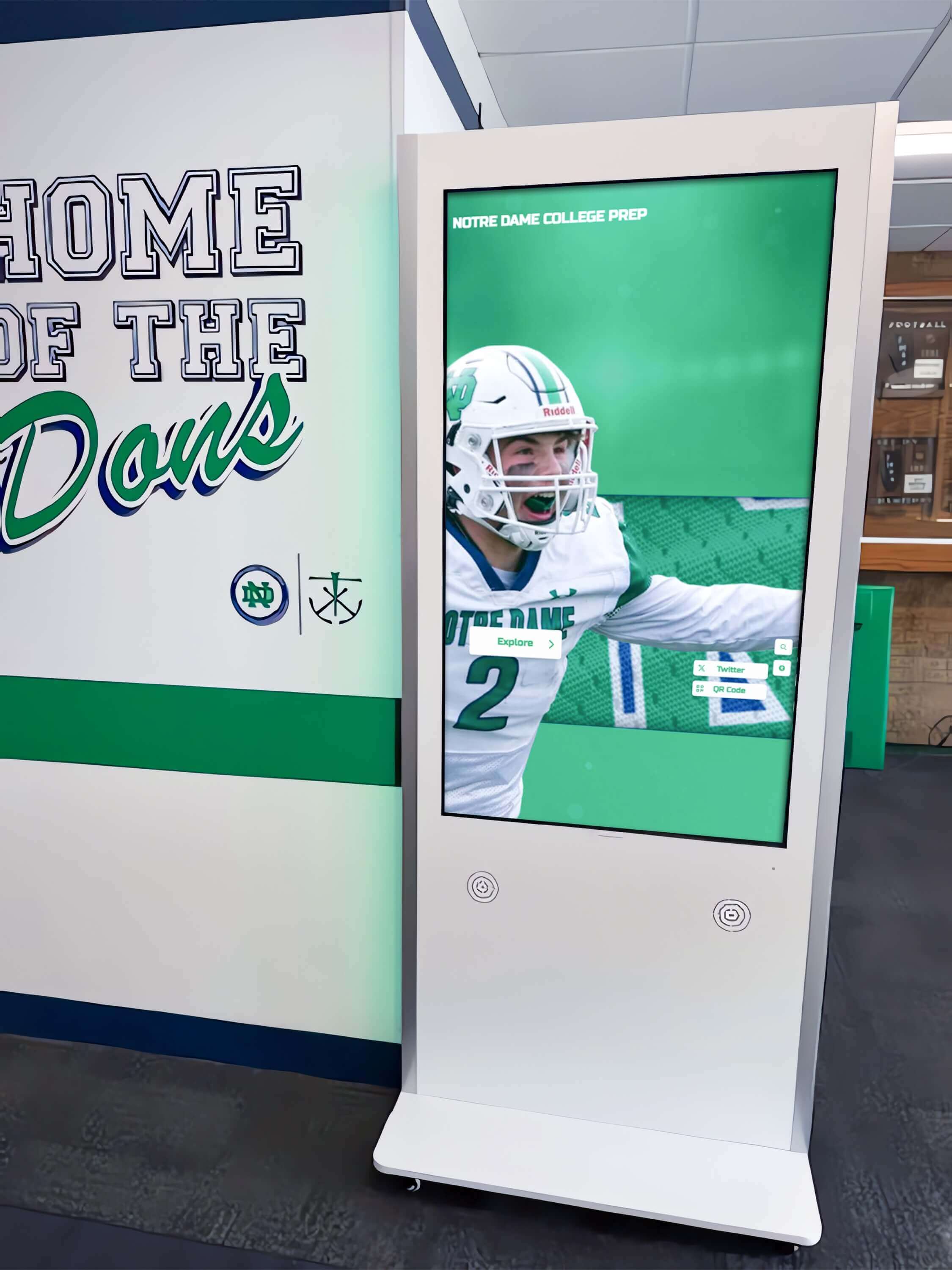
71. Photo Galleries and Yearbook Archives: Allow users to browse current event photos, historical yearbook images, and institutional archives. Digital yearbook displays preserve history while making it accessible.
72. Interactive Campus Directory: Searchable directory showing staff names, departments, room locations, email addresses, and phone extensions.
73. Virtual Tours and 360-Degree Views: Provide interactive campus tours showing facilities, classrooms, athletic venues, and special spaces. Particularly valuable for prospective families.
74. Hall of Fame Exploration: Interactive databases allowing users to search athlete, alumni, or achievement records with filters by sport, year, achievement type, or name.
75. Historical Timeline Navigation: Touch-enabled timelines users can scroll through exploring institutional history, milestones, facilities, leaders, and program evolution.
76. Resource Libraries and Document Access: Provide access to policies, handbooks, forms, schedules, and reference documents downloadable via QR code or email.
77. Interactive Maps with Points of Interest: Touch maps highlighting building features, historical locations, public art, memorial spaces, and notable areas with detailed information.
78. Poll and Survey Participation: Gather community input on decisions, preferences, or opinions through interactive polls with real-time results display.
79. Quiz and Trivia Games: Educational games testing knowledge about curriculum topics, institutional history, or general information with scoring and leaderboards.
80. Event Registration and Sign-Ups: Enable direct registration for events, volunteer opportunities, or programs through interactive forms.
Social Media Integration
81. Live Social Media Feeds: Display curated social media posts from official accounts showing real-time updates, photos, and community engagement.
82. Social Media Hashtag Displays: Show posts using specific hashtags from events, campaigns, or initiatives. Encourages social media participation while displaying authentic community voice.
83. Instagram Photo Walls: Curate Instagram posts featuring institutional life, student experiences, and community pride displayed in grid layouts.
84. Video Testimonials and Stories: Share video content from students, staff, alumni, or community members telling their stories and experiences.
85. User-Generated Content Submissions: Allow community members to submit photos, videos, or messages for display consideration (with appropriate moderation and approval).
Real-Time and Dynamic Content (Ideas 86-100)
Dynamic content changes automatically based on time, data, or external information, maintaining relevance without manual updates.
Data-Driven Content
86. Attendance Statistics: Display daily attendance rates, trends over time, and comparisons to previous years. Gamifies attendance while maintaining privacy.
87. Library Book Availability: Show popular book availability, new arrivals, and current checkout statistics encouraging library utilization.
88. Lunch Account Balance Reminders: Generic reminders about checking lunch account balances and how to add funds without displaying individual information.
89. Transportation Updates: Real-time bus arrival information, route delays, dismissal changes, and transportation announcements.
90. Parking Availability: Show available parking spaces in different lots helping visitors and staff locate parking efficiently.
91. Room Availability and Booking: Display meeting room or facility availability with reservation calendars and booking instructions.
92. Energy Consumption Dashboards: Show building energy usage, sustainability metrics, and conservation comparisons demonstrating environmental responsibility.
93. Fundraising Thermometers: Live updating displays showing campaign progress toward goals with visual thermometers, progress bars, or percentage counters.
94. Countdown Clocks to Deadlines: Automatic countdowns to registration deadlines, application due dates, event start times, or other time-sensitive milestones.
95. Cafeteria Wait Times: Estimated wait times for food service lines helping students and staff plan lunch periods efficiently.
Live Information Feeds
96. News Tickers: Scrolling text displaying breaking news, announcements, or alerts that require immediate attention.
97. Stock Market and Financial Education: Display market indexes, stock performance for educational purposes, or business statistics relevant to career education.
98. RSS Feed Integration: Automatically pull content from news sources, blogs, or educational websites curated for relevance and appropriateness.
99. Sports Scores and Standings: Live scoring updates for ongoing games plus standings, rankings, and playoff scenarios.
100. Traffic and Commute Information: Display local traffic conditions, major route delays, and estimated commute times helping staff and students plan travel.

Specialized Environment Content (Ideas 101-120)
Different environments require specialized content approaches aligned with specific audience needs and organizational contexts.
Healthcare and Wellness Settings
101. Health Tips and Wellness Information: Daily health facts, nutrition guidance, exercise suggestions, and wellness resources promoting healthy behaviors.
102. Mental Health Resources: Information about counseling services, stress management techniques, mental health awareness, and support resources available.
103. Immunization and Health Screening Reminders: Timely reminders about required health screenings, immunization deadlines, and where to obtain services.
104. Healthy Recipe Ideas: Share nutritious recipes with ingredients, instructions, and nutritional information promoting healthy eating.
105. Fitness Challenge Progress: Display participation and progress in institutional wellness challenges, step competitions, or fitness initiatives.
Corporate and Business Environments
106. Company Performance Metrics: Share appropriate business statistics, sales achievements, customer satisfaction scores, and performance indicators building transparency.
107. Employee Training Schedules: Display upcoming training sessions, professional development opportunities, certification programs, and enrollment information.
108. Meeting Room Schedules: Show current and upcoming room reservations helping employees locate available spaces and verify reservations. Corporate employee recognition programs strengthen workplace culture.
109. Company News and Press Releases: Share external media coverage, press releases, industry awards, and public recognition of organizational achievements.
110. Customer Testimonials and Success Stories: Display positive customer feedback, case studies, and success stories demonstrating value delivery.
Retail and Hospitality Settings
111. Product Spotlights and Features: Highlight specific products or services with detailed information, benefits, pricing, and availability.
112. Promotional Offers and Discounts: Display current sales, limited-time offers, coupon codes, and special promotions encouraging purchases.
113. Customer Loyalty Program Information: Explain loyalty programs, membership benefits, reward tiers, and how customers can enroll.
114. Queue Management and Wait Times: Show estimated wait times for service, current queue positions, or alternative service options when busy.
115. Customer Reviews and Ratings: Display positive customer reviews, ratings, and feedback building credibility and social proof.
Cultural and Entertainment Venues
116. Exhibit Information and Artifacts: Provide detailed information about exhibits, collections, artifacts, artist statements, and historical context.
117. Interactive Donor Recognition: Digital donor recognition displays honor supporters while inspiring future philanthropy.
118. Performance Schedules and Artist Information: Display upcoming performances, artist biographies, program details, and ticket availability.
119. Behind-the-Scenes Content: Share production processes, restoration work, conservation efforts, or operational insights creating deeper engagement with the venue.
120. Visitor Feedback and Comments: Allow visitors to leave digital comments, share experiences, or provide feedback with moderated selections displayed for other guests.
Implementation Strategies for Maximum Effectiveness
Generating ideas represents just the first step—successful digital signage requires strategic implementation ensuring content remains fresh, relevant, and engaging over time.
Content Rotation and Refresh Strategies
Establishing Content Calendars: Plan content themes, updates, and rotation schedules weeks or months in advance. Calendar approaches ensure consistent updates without last-minute scrambles for new content.
Balancing Evergreen and Timely Content: Mix permanent content that requires infrequent updates (mission statements, facility information) with timely content that changes regularly (daily announcements, event promotions). The 70-20-10 rule works well—70% evergreen content, 20% seasonal or cyclical content, 10% urgent or timely content.
Automating Updates Where Possible: Leverage data integrations, RSS feeds, and automated content pulls reducing manual update requirements. Weather, news, social media, and calendar integrations maintain freshness automatically.
Assigning Clear Content Ownership: Designate specific individuals or departments responsible for different content categories. Clear ownership prevents content from becoming stale when everyone assumes someone else is managing updates.
Technical Considerations
Content Management Platform Selection: Choose digital signage software that matches your technical capabilities and content requirements. Some platforms excel at passive content display while others specialize in interactive experiences.
Display Location Strategy: Place screens where audiences naturally congregate—building entrances, lobbies, cafeterias, waiting areas, and main thoroughfares. Even excellent content fails if positioned where few viewers pass.
Screen Orientation and Resolution: Vertical (portrait) orientation works better for certain content types like directories and scrolling lists, while horizontal (landscape) suits video content and presentations. Ensure content design matches physical screen specifications.
Accessibility Compliance: Design content that meets accessibility standards including appropriate text sizes, color contrast ratios, screen reader compatibility for interactive kiosks, and alternative text for images.
Measuring Content Effectiveness
Engagement Analytics: When possible, track how users interact with content—which screens receive the most attention, what interactive features get used, how long viewers engage, and which content leads to desired actions.
Audience Feedback: Survey stakeholders about content value, relevance, and desired additions. Direct feedback identifies gaps and validates what’s working well.
Achievement of Objectives: Define success metrics aligned with content purposes—increased event attendance, improved awareness of programs, higher participation rates, or enhanced organizational pride. Measure whether content delivers against these objectives.
Content Performance Comparison: Test different content types, layouts, timing, and approaches. Data comparing performance informs iterative improvements and optimization.
Building Sustainable Digital Signage Programs
The most common failure mode for digital signage involves initial enthusiasm followed by gradual content stagnation as responsibilities fall to already-busy staff without dedicated time or resources.
Organizations implementing successful long-term digital signage programs build sustainability through dedicated content management resources, realistic update schedules matching available capacity, streamlined content creation workflows, integration with existing communication channels, and stakeholder engagement maintaining diverse input sources.
Digital recognition displays like those provided by Rocket Alumni Solutions address content sustainability specifically for recognition use cases through specialized content management interfaces requiring minimal training, pre-built templates for common recognition scenarios, structured content workflows guiding users through profile creation, and ongoing support helping organizations maximize their investment. Solutions designed specifically for recognition needs simplify the content management burden compared to adapting general-purpose signage platforms.
The 120 ideas presented here provide starting points adaptable to virtually any digital signage or interactive kiosk deployment. Success comes not from implementing every idea, but from selecting content aligned with audience needs, organizational objectives, and available resources, then executing consistently over time.
Organizations evaluating digital signage solutions should prioritize platforms matching their primary content types and update cadences. Institutions focused on recognition and achievement benefit from specialized platforms purpose-built for those use cases, while organizations with broader content needs may prefer flexible general-purpose solutions.
Book a demo to explore how interactive touchscreen displays specifically designed for recognition and institutional storytelling can transform your digital signage strategy with content management approaches built for long-term sustainability.






























