



Schools, universities, museums, and nonprofit organizations increasingly rely on digital hall of fame tools to celebrate achievements across athletics, arts, academics, donor recognition, and institutional history. Unlike traditional trophy cases and engraved plaques constrained by physical space and fixed content, modern recognition platforms provide unlimited capacity, interactive exploration, and update flexibility that honors past excellence while inspiring current communities.
Selecting the right hall of fame tool requires understanding how different platforms serve specific recognition needs—from athletic programs tracking records and championships to advancement offices acknowledging philanthropic support, from performing arts programs showcasing talent to museums preserving institutional heritage. The platform that works well for one use case may fall short for another.
This analysis examines ten hall of fame tools serving diverse recognition applications, evaluating features, implementation approaches, pricing structures, and organizational fit. The rankings reflect each platform’s capabilities, user experience quality, support resources, and proven success across multiple recognition contexts.
Evaluation Criteria
This comparison assesses platforms across seven dimensions:
- Feature Completeness: Content management capabilities, customization options, multimedia support, and recognition-specific functionality
- Ease of Use: Interface intuitiveness, learning curve, and accessibility for non-technical administrators
- Design Quality: Visual presentation, template availability, and branding flexibility
- Implementation Support: Setup assistance, training resources, and ongoing technical help
- Scalability: Capacity to accommodate growing recognition programs without performance issues
- Pricing Transparency: Cost clarity, value delivery, and total ownership expenses
- Cross-Category Versatility: Ability to serve athletics, donors, arts, and history recognition equally well
1. Rocket Alumni Solutions: Best Overall for Multi-Category Recognition
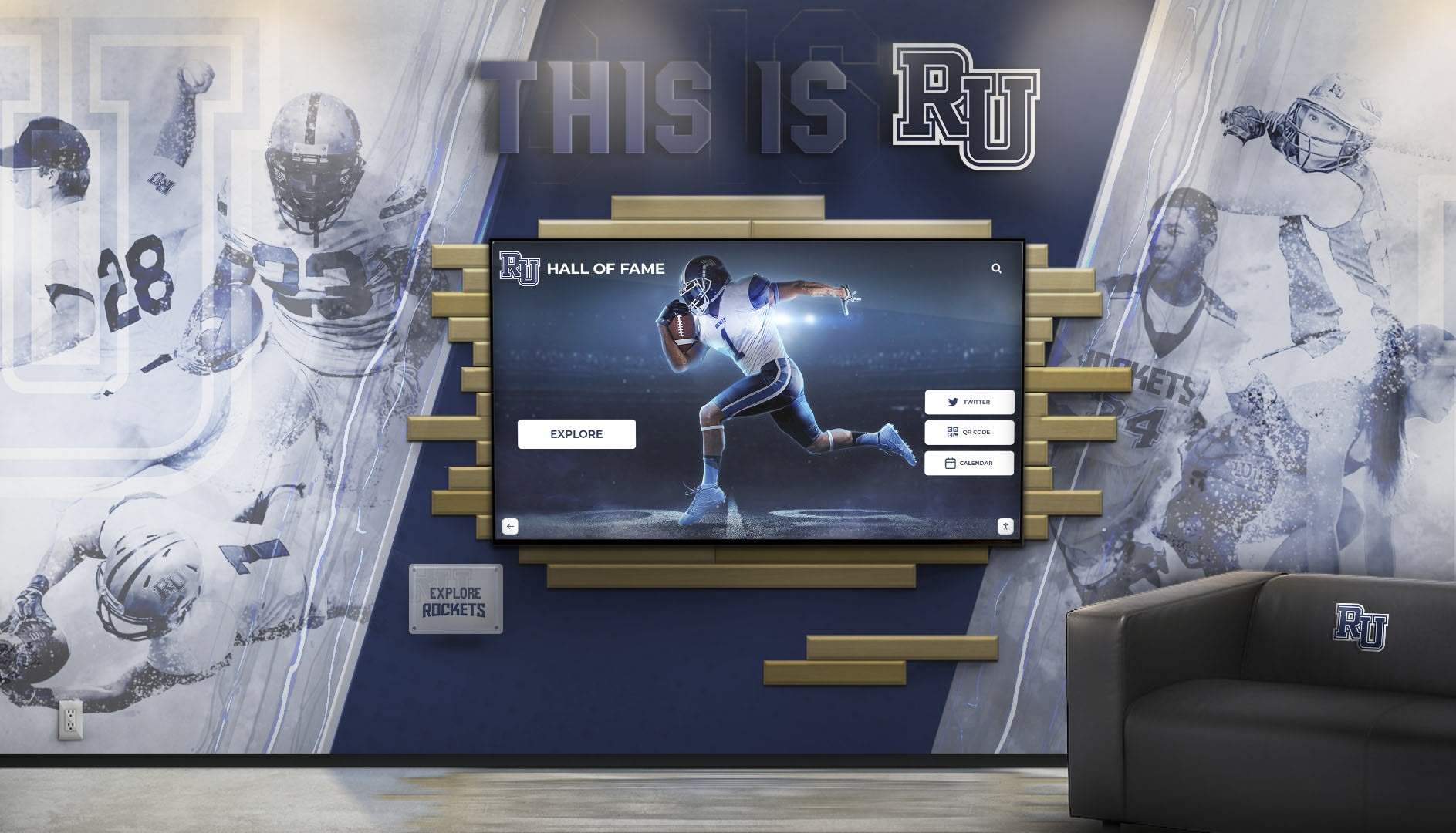
Best for: Organizations requiring comprehensive recognition across multiple categories with professional support
Rocket Alumni Solutions delivers the most complete hall of fame platform designed specifically for educational institutions, athletic programs, nonprofits, and cultural organizations. The software serves 900+ clients across all 50 states, demonstrating proven capabilities for diverse recognition applications from athletic halls of fame to donor walls, academic achievement displays to arts program showcases.
Core Strengths
Purpose-Built Recognition Architecture Unlike adapted digital signage or repurposed content management systems, Rocket’s platform was architected specifically for recognition applications. The software intrinsically understands honoree profiles, achievement categories, chronological organization, multimedia integration, and interactive exploration patterns. This purpose-built foundation eliminates the awkward workarounds required when forcing general platforms into recognition roles.
16+ Recognition Templates Rocket provides specialized layouts for athletic halls of fame, donor recognition walls, academic achievement boards, distinguished alumni showcases, arts program galleries, historical timelines, memorial tributes, championship celebrations, individual inductee profiles, team recognition displays, volunteer appreciation, and scholarship benefactor acknowledgment. Each template incorporates best practices learned from hundreds of implementations rather than requiring organizations to design recognition structures from scratch.
Dual-Environment Capability The platform operates seamlessly as both physical touchscreen installations for on-site engagement and web-accessible applications enabling worldwide reach. Content synchronizes automatically between environments, ensuring consistent recognition across contexts. This dual capability particularly benefits alumni recognition, allowing graduates to explore their institution’s hall of fame from anywhere while visitors experience rich interactive displays on campus.
Unlimited Capacity and Categories Organizations can create unlimited honoree profiles organized into unlimited custom categories without subscription tier restrictions or capacity limits. This scalability proves essential for institutions with extensive recognition needs spanning multiple sports, academic disciplines, donor levels, artistic achievements, and historical periods. The platform accommodates recognition programs ranging from 50 inductees to 5,000+ without performance degradation.
Comprehensive Analytics Rocket tracks detailed engagement metrics including content popularity, search patterns, visitor demographics, and interaction depth. These insights help organizations understand which achievements resonate most, optimize content strategies, and demonstrate program impact to stakeholders. The reporting capabilities support recognition program evaluation and strategic planning.
Implementation and Support
Turnkey Professional Services Rocket provides complete implementation assistance including custom design aligned with institutional branding, content migration from existing systems, administrator training, technical installation for physical displays, and ongoing platform updates. This turnkey approach eliminates the complexity and technical expertise required for successful recognition program launches.
Strategic Recognition Guidance Beyond technical support, Rocket’s team provides best practice recommendations for recognition criteria, content organization, multimedia integration, and program promotion based on extensive experience across diverse organizations. This strategic consultation helps institutions avoid common pitfalls and maximize recognition program effectiveness.
Considerations
Investment Level Custom pricing typically ranges from $10,000-$40,000 for initial implementation with $2,000-$8,000 annual subscriptions depending on features, display configurations, and support requirements. This represents significant investment compared to budget alternatives, though the comprehensive capabilities and professional support often prove more cost-effective than DIY approaches when accounting for design, development, and ongoing management expenses.
Learning Curve for Advanced Features While basic content management remains straightforward, fully utilizing Rocket’s extensive customization capabilities requires time investment. Organizations with limited training capacity may initially use only core features before progressively discovering advanced functionality through documentation and support interactions.
Best For
Large schools and universities with extensive recognition needs across multiple categories, athletic programs requiring sophisticated record-keeping and multimedia integration, advancement offices managing donor recognition at multiple giving levels, museums and cultural institutions preserving institutional history, and any organization prioritizing professional presentation and comprehensive support over cost minimization.

2. TouchPros: Best for Turnkey Hardware-Software Packages
Best for: Schools wanting complete installations with impressive physical TouchWall environments
TouchPros, established in 2008, specializes in integrated hardware and software packages creating visually striking physical recognition installations. The company’s TouchWall systems combine commercial displays with architectural frameworks transforming hallways and lobbies into immersive recognition spaces. Complete packages typically range from $20,000-$40,000 depending on configuration complexity.
Strengths
Physical Installation Expertise TouchPros excels at creating impressive built-in displays that become architectural features rather than appearing as afterthought technology additions. The company’s design and installation services handle every aspect from electrical work to structural integration, delivering polished results that complement institutional environments.
Athletic Recognition Focus Templates and features specifically target athletic recognition needs including sports schedules integration, social media feed displays, and color scheme customization matching team branding. This athletic specialization benefits sports-focused organizations seeking turnkey recognition solutions.
Limitations
Outdated Software Experience Customer feedback consistently cites TouchPros software as feeling dated compared to modern platforms. The lack of visual editing tools, real-time update capabilities, and contemporary interface design creates frustration for administrators accustomed to intuitive modern applications. Updates require navigating traditional CMS workflows rather than simple drag-and-drop operations.
Limited Directory Capacity Base packages include only three content directories, with additional sections available at extra cost. Schools with recognition spanning multiple sports, academic programs, arts disciplines, and other categories quickly exceed basic capacity, increasing total investment beyond initial quotes.
Weak Non-Athletic Applications While adequate for athletic recognition, TouchPros lacks specialized features and templates for donor recognition, arts programs, or historical preservation applications. Organizations with diverse recognition needs find the platform’s athletic focus limiting.
Best For
High schools and colleges prioritizing athletic recognition with complete physical installation requirements, institutions comfortable with traditional content management workflows, and organizations valuing impressive TouchWall aesthetics over software sophistication.
3. Vital Signs Wall of Fame: Best for One-Time Purchase Model
Best for: Organizations preferring capital investments over annual subscriptions
Vital Signs, operating since 2001, offers unique pricing combining hardware, software, installation, and support into single upfront purchases ranging from $12,000-$19,500 rather than subscription models. This approach suits organizations managing capital budgets differently than operational expenses, enabling multi-year recognition programs without recurring fees.
Strengths
Comprehensive One-Time Investment Complete packages include touchscreen hardware, media player, software license, content management access, professional installation, and support services without annual renewals. For organizations planning decade-long installations, total cost of ownership may favor one-time purchases over accumulated subscription fees.
Content Advocate Program Recognizing that content development challenges organizations, Vital Signs offers professional assistance organizing and uploading historical recognition data. This white-glove service helps launch displays with comprehensive content rather than minimal initial information requiring gradual expansion.
Limitations
Dated Software and Design Multiple customers report frustrations with outdated software lacking visual editors, modern interface design, or recent feature updates. Displays often resemble basic directory listings rather than polished recognition presentations. The platform hasn’t meaningfully evolved in recent years, causing progressive divergence from contemporary user experience expectations.
Weak Branding Capabilities Limited customization options for colors, layouts, and visual identity elements result in displays that may not strongly reflect institutional character. Organizations prioritizing distinctive branded recognition find Vital Signs constraining.
Limited Cross-Category Versatility The platform serves basic athletic and academic recognition adequately but lacks specialized capabilities for sophisticated donor recognition, arts program showcases, or rich historical preservation applications.
Best For
Schools with capital budget availability for one-time investments, institutions comfortable with “set it and forget it” approaches rather than actively managed recognition programs, and organizations not prioritizing cutting-edge software or frequent updates.
4. Rise Vision: Best Free Digital Signage Option
Best for: Budget-constrained organizations needing simple slideshow-style recognition
Rise Vision provides free cloud-based digital signage software that organizations can adapt for basic hall of fame displays. While not purpose-built for recognition, the platform’s zero-cost model makes digital recognition accessible to organizations with extremely limited budgets.
Strengths
Free Software Access Rise Vision’s basic plan costs nothing, eliminating software licensing barriers. Organizations only invest in display hardware (commercial displays or touchscreens starting around $500-$2,000) and content creation time.
Cloud-Based Management Content updates occur remotely through web browsers without requiring physical access to displays. Multiple administrators can manage content from different locations, facilitating collaborative recognition program management.
Scheduling Capabilities The platform supports scheduling different content for specific times or dates, enabling rotating recognition spotlights, seasonal themes, or time-sensitive displays coinciding with institutional events.
Limitations
Not Designed for Recognition Rise Vision was built for announcements and advertisements, not comprehensive recognition. Organizations must manually create every recognition display using general design tools without templates, database structures, or recognition-specific features. This labor-intensive approach becomes overwhelming for programs recognizing hundreds of individuals.
Limited Interactivity The platform primarily supports passive slideshow displays rather than interactive exploration. Visitors watch content rotate rather than searching for specific honorees, browsing categories, or engaging with multimedia content. This passive approach limits engagement compared to interactive recognition platforms.
No Web Accessibility Rise Vision serves physical displays only, without web-accessible versions extending recognition reach to alumni, donors, or community members not visiting physical locations. This constraint particularly limits donor recognition and alumni engagement applications.
Best For
Small organizations with fewer than 50 inductees, schools needing temporary solutions while planning permanent installations, and budget-constrained programs willing to trade ease-of-use and sophistication for zero software costs. Not appropriate for comprehensive, long-term recognition programs.
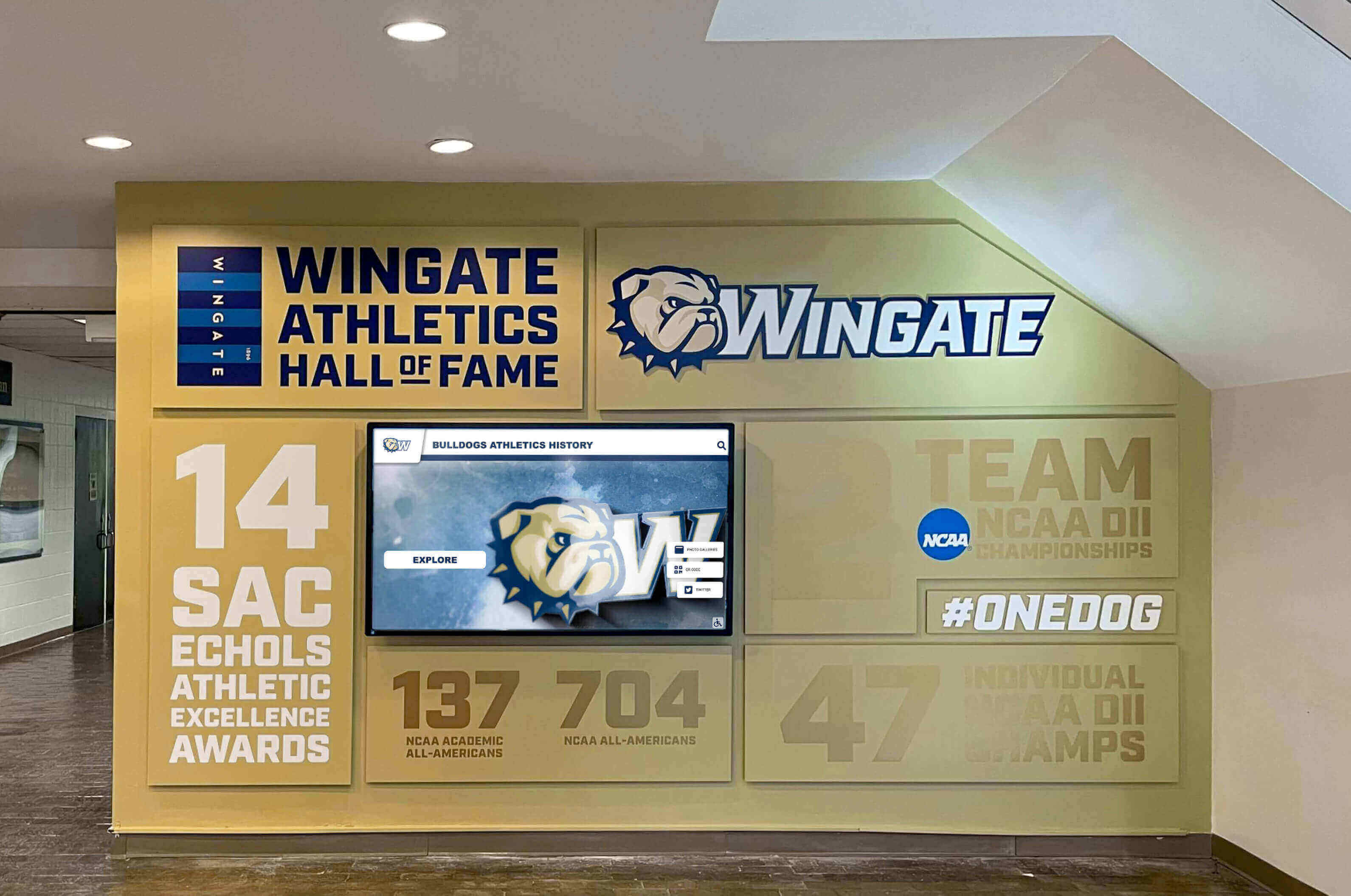
5. Squarespace: Best General Website Builder for Recognition
Best for: Organizations needing simple web-based recognition without physical displays
Squarespace, while not designed specifically for halls of fame, provides website building capabilities that organizations can adapt for digital recognition. Plans range from $16-$49 monthly ($192-$588 annually), offering accessible entry points for web-based recognition programs.
Strengths
Professional Website Templates Hundreds of visually appealing templates provide starting points that organizations customize for recognition purposes. The drag-and-drop editor enables building custom layouts without coding expertise.
Affordable Monthly Pricing Dramatically lower costs than specialized recognition platforms make Squarespace accessible to organizations with minimal budgets. The platform suits small programs where professional recognition software investment exceeds available resources.
Multimedia Embedding Organizations can embed photos, videos, documents, and other media creating richer recognition content than simple text. Integration with YouTube, Vimeo, and similar services enables comprehensive multimedia presentations.
Limitations
Manual Recognition Creation Squarespace provides no templates or automation for recognition-specific content. Every inductee profile, achievement record, and recognition entry requires manual creation and formatting. This labor-intensive process becomes impractical when recognizing hundreds of individuals or managing multiple categories.
Not Optimized for Touchscreens While Squarespace sites can display on touchscreens, they’re designed for mouse navigation rather than touch interfaces. Scrolling, tapping, and interaction patterns may feel awkward compared to purpose-built touchscreen applications.
Limited Recognition Features Searchable databases, automatic record tracking, statistics displays, and other recognition-specific tools don’t exist. Organizations build everything manually using general website capabilities, limiting sophistication and requiring ongoing manual maintenance as programs grow.
Best For
Small organizations with limited recognition volume needing simple web-based recognition, budget-constrained programs requiring low-cost solutions, and institutions experimenting with digital recognition before investing in dedicated platforms. Not suitable for comprehensive programs or physical touchscreen installations.
6. Touchstone Digital Solutions: Best for Boutique Customization
Best for: Organizations seeking personalized service and highly customized installations
Touchstone Digital Solutions, founded by a former Rocket employee, provides customizable digital recognition combining software platforms with touchscreen hardware. As a smaller, newer provider, Touchstone offers boutique-style personalized service catering to organizations wanting individualized attention and custom solutions.
Strengths
Personalized Implementation Touchstone emphasizes working closely with each organization to create customized digital hall of fame installations matching specific requirements, branding preferences, and aesthetic goals. This hands-on approach suits institutions wanting recognition displays that feel unique rather than template-based.
WCAG 2.1 Accessibility Compliance Touchstone specifically addresses accessibility standards, ensuring displays remain usable for visitors with diverse abilities. This commitment to inclusivity increasingly matters as organizations prioritize universal design principles in public installations.
Recognition Layout Library Similar to larger competitors, Touchstone provides pre-designed layouts for common recognition scenarios while allowing customization meeting individual needs. This balance between starting templates and flexibility helps organizations achieve professional results efficiently.
Limitations
Limited Track Record As a relatively new provider, Touchstone has a smaller customer footprint and shorter operational history than established competitors. Organizations seeking proven solutions with extensive customer references and years of demonstrated reliability may hesitate to select a newer entrant.
Minimal Verified Reviews Unlike mature competitors with substantial review histories, Touchstone doesn’t yet have extensive verified customer feedback. Organizations typically want testimonials and reviews before making significant recognition program investments.
Unknown Pricing Touchstone doesn’t publish pricing information, requiring custom quotes for each project. While this allows pricing flexibility, it prevents organizations from conducting preliminary budget feasibility assessments before engaging in sales conversations.
Best For
Organizations wanting highly personalized service, those with unique requirements not well-served by standard platforms, institutions prioritizing accessibility compliance, and those comfortable partnering with smaller providers offering individualized attention.
7. WordPress with Custom Plugins: Best DIY Platform for Technical Teams
Best for: Organizations with internal technical expertise willing to build custom solutions
WordPress powers over 40% of websites globally and can be configured for hall of fame applications through appropriate plugins and customization. Organizations with technical resources can build recognition platforms for $2,000-$15,000 setup costs plus $500-$3,000 annual hosting and maintenance expenses.
Strengths
Extensive Plugin Ecosystem Thousands of plugins add functionality including custom post types for honoree profiles, advanced custom fields for achievement details, search and filtering capabilities, media gallery management, and social sharing integration. This flexibility enables building customized recognition structures tailored to specific needs.
Developer Community Support The vast WordPress developer community provides extensive documentation, tutorials, and troubleshooting resources. Organizations can find technical assistance and solutions for virtually any implementation challenge.
Lower Initial Costs WordPress core software is free, with costs limited to hosting, theme purchases, plugin licenses, and development or customization time. This makes WordPress-based solutions more affordable than purpose-built platforms for organizations with internal technical capacity.
Limitations
Not Optimized for Recognition WordPress wasn’t designed for hall of fame applications, requiring awkward adaptations and workarounds for common recognition needs. Organizations essentially build custom recognition platforms from general website components—a complex, time-consuming process.
Security and Maintenance Burden WordPress sites, especially those using multiple third-party plugins, face frequent security vulnerabilities requiring vigilant maintenance. Organizations assume responsibility for security updates, plugin compatibility management, and technical troubleshooting without vendor support.
Performance Challenges Heavily customized WordPress installations with numerous plugins often suffer from slow loading times, technical conflicts between components, and degrading performance as content volume grows. These issues require ongoing technical attention to resolve.
Best For
Organizations with dedicated technical teams, institutions already using WordPress extensively, and those comfortable with plugin management and ongoing maintenance. Most appropriate for technically sophisticated organizations willing to trade ease-of-use for cost savings and customization control.
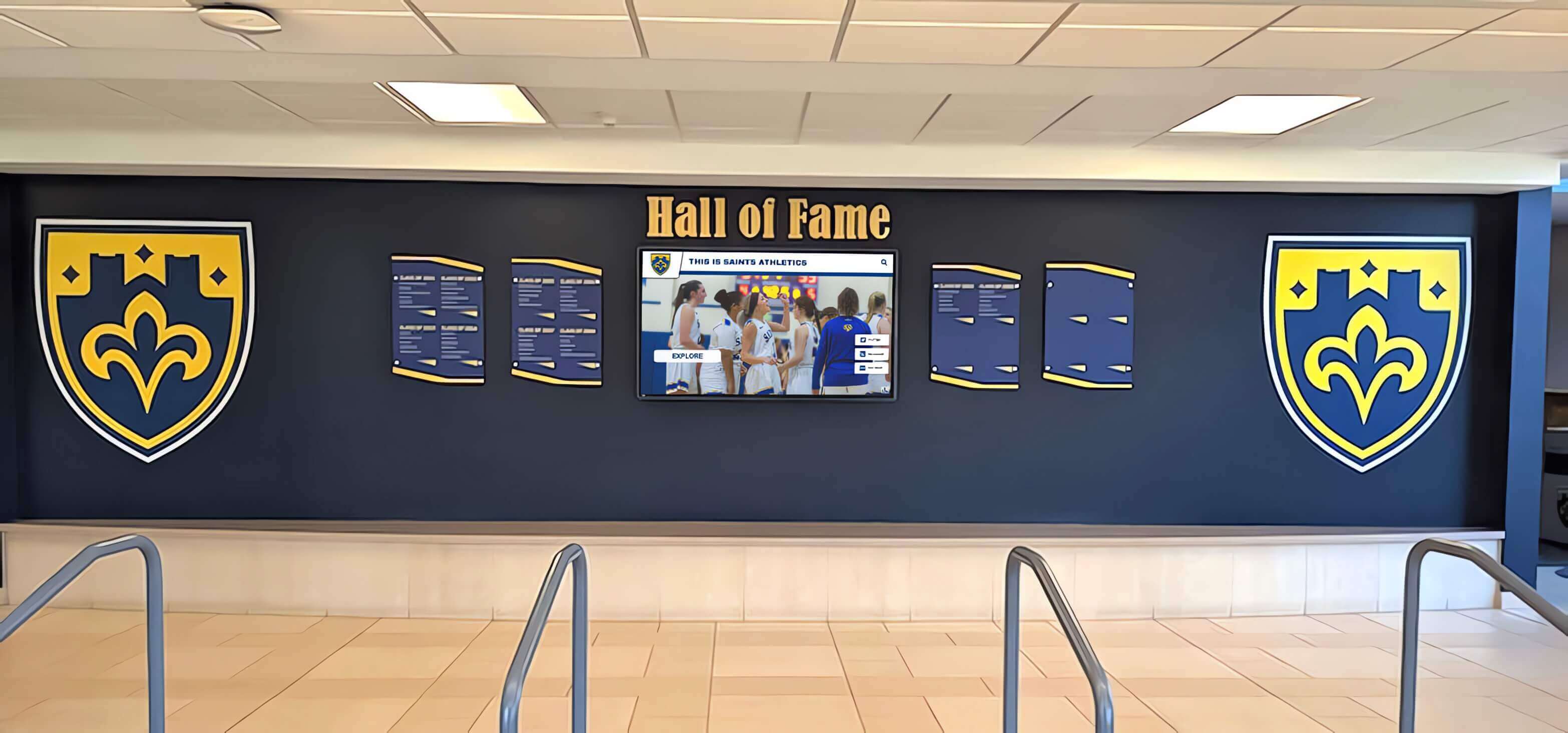
8. Canva Presentations: Best Quick Slideshow Solution
Best for: Temporary displays or event-specific recognition without technical complexity
Canva, primarily designed for graphic design and presentations, offers surprisingly capable tools for creating recognition slideshows. Free accounts provide basic capabilities, while Pro accounts ($120 annually) unlock additional features. Organizations can create looping presentations running on any display for simple recognition needs.
Strengths
Intuitive Design Interface Canva’s drag-and-drop editor and thousands of templates enable creating visually appealing recognition slides without design expertise. The platform feels accessible to non-technical administrators unfamiliar with complex software.
Collaborative Creation Multiple team members can simultaneously edit presentations, making collaborative content development simple. Real-time synchronization ensures all users work with current content.
Quick Content Creation Users familiar with presentation software can create recognition slides in minutes. This speed suits time-sensitive needs like event-specific recognition displays or temporary installations while planning permanent solutions.
Limitations
No Interactivity Canva presentations offer only passive slideshow playback without search functionality, interactive exploration, or user-driven navigation. Visitors watch slides cycle automatically rather than engaging with content meaningfully.
Poor Scalability Large presentations become slow to edit and display as slide counts grow beyond 50-100. Canva wasn’t designed for managing hundreds of recognition entries, making it impractical for comprehensive programs.
Lacks Recognition Features No database organization, achievement categorization, record tracking, or recognition-specific tools exist. Organizations manually create and format every slide, with no automation or structured data management.
Best For
Schools needing temporary recognition during events or while planning permanent installations, organizations wanting to experiment with digital recognition concepts before budget commitments, and extremely small programs with minimal recognition volume. Not appropriate for long-term comprehensive recognition programs.
9. Google Slides: Best Free Slideshow Option
Best for: Zero-budget temporary solutions or proof-of-concept demonstrations
Google Slides, while designed for presentations, can serve as rudimentary hall of fame solutions by creating looping slideshows featuring photos and recognition content. The platform requires only free Google accounts, making it the most accessible option for budget-constrained organizations.
Strengths
Completely Free Zero software costs eliminate budget barriers. Organizations invest only in display hardware (reusing existing equipment in many cases) and content creation time.
Familiar Interface Most educators and administrators already know Google Slides from presentation creation, eliminating training requirements. Building recognition slides uses existing skills.
Instant Updates Changes to presentations sync automatically across all devices accessing the file. Multiple users can collaborate simultaneously, simplifying content development.
Limitations
Extremely Limited Functionality Google Slides provides only basic slideshow capabilities—no search, no interaction, no database organization, and no recognition-specific features whatsoever. The platform represents the absolute minimum for digital recognition.
Unprofessional Appearance Without substantial design effort, presentations look like what they are—basic slideshows rather than polished recognition displays. Achieving professional visual quality requires extensive manual design work for each slide.
Severe Scalability Constraints Presentations exceeding 50-100 slides experience slow loading and editing, frequent glitches, and performance degradation. Google Slides wasn’t designed for comprehensive recognition databases.
Best For
Schools needing proof-of-concept demonstrations to build support for future funding, organizations requiring temporary solutions for weeks rather than years, and extremely small programs with fewer than 30 inductees. Should never serve as long-term solutions for serious recognition programs.
10. Custom Development: Best for Unique Requirements and Large Budgets
Best for: Organizations with exceptional needs and substantial development resources
Organizations with unique requirements not addressed by existing platforms can commission custom hall of fame applications using modern web technologies like React, Vue.js, or traditional CMS platforms like Drupal. Custom projects typically require $25,000-$100,000+ for initial development plus $10,000-$30,000 annually for hosting, maintenance, and updates.
Strengths
Complete Design Control Custom development enables perfect alignment with existing websites, brand guidelines, and specific organizational requirements without template constraints or platform limitations. Organizations can implement any feature, layout, or integration imaginable.
Full Data Ownership Institutions maintain complete control over data structures, hosting environments, and platform architecture without dependency on third-party vendors. This control matters for organizations with strict data governance requirements or integration needs with proprietary systems.
Unlimited Functionality Development teams can create sophisticated features like advanced analytics dashboards, unique interactive elements, custom integrations with legacy systems, or specialized recognition workflows not available in off-the-shelf platforms.
Limitations
Significant Resource Requirements Custom development demands substantial technical expertise, project management capacity, and ongoing maintenance resources that many organizations lack internally. The complexity often exceeds initial expectations.
Extended Timelines Custom projects typically require 6-12 months for design, development, testing, and launch—significantly longer than purpose-built platforms deploying in weeks. This delay postpones recognition program benefits.
Ongoing Maintenance Burden Organizations assume full responsibility for security updates, bug fixes, feature enhancements, and technical support without vendor assistance. This creates long-term operational overhead and requires sustained technical staffing.
High Failure Risk Custom projects face higher failure rates due to scope creep, technical challenges, changing requirements, and organizational dynamics. The lack of proven templates means organizations learn through trial and error rather than leveraging accumulated best practices.
Best For
Large universities with dedicated web development teams and budgets exceeding $100,000, organizations with highly specific requirements truly not addressed by existing platforms, and institutions already investing heavily in custom web development who can integrate recognition into broader digital initiatives. Most organizations achieve better outcomes at lower cost through specialized platforms rather than custom development.

Comparative Analysis: Key Selection Factors
Understanding how platforms compare across critical dimensions helps organizations make informed decisions:
Feature Completeness and Recognition Specialization
Most Comprehensive: Rocket Alumni Solutions (purpose-built with 16+ recognition templates, unlimited categories, dual physical-web environments, and sophisticated analytics)
Specialized but Limited: TouchPros (strong athletic focus but weak for donor, arts, and historical recognition), Vital Signs (basic recognition across categories without sophisticated features)
General Purpose Requiring Adaptation: WordPress, Squarespace, custom development (require building recognition structures from general web capabilities)
Minimal Recognition Features: Rise Vision, Canva, Google Slides (basic slideshow capabilities only)
Ease of Use and Administrator Experience
Most User-Friendly: Rocket Alumni Solutions (intuitive visual editor with recognition-specific workflows), Canva (simple design interface), Google Slides (familiar presentation tools)
Moderate Complexity: Squarespace (website builder learning curve), WordPress (requires plugin configuration understanding)
Most Complex: TouchPros and Vital Signs (traditional CMS workflows), custom development (requires technical expertise)
Cross-Category Versatility
Serves All Recognition Types Equally: Rocket Alumni Solutions (dedicated templates and features for athletics, donors, arts, history, and academics)
Category-Specific Strengths: TouchPros (athletic focus), Squarespace (general web content without recognition specialization)
Category-Agnostic: Rise Vision, Canva, Google Slides, WordPress (organizations build recognition structures manually for any category)
Pricing and Total Cost of Ownership
Highest Investment: Rocket Alumni Solutions ($10,000-$40,000 initial, $2,000-$8,000 annual), custom development ($25,000-$100,000+ initial, $10,000-$30,000 annual)
Medium Investment: TouchPros ($20,000-$40,000 complete), Vital Signs ($12,000-$19,500 one-time), WordPress ($2,000-$15,000 setup, $500-$3,000 annual)
Low Investment: Squarespace ($192-$588 annual), Canva ($0-$120 annual), Rise Vision (free software)
Free: Google Slides (requires only hardware)
When evaluating costs, consider total ownership expenses including design services, content development time, training requirements, ongoing maintenance, technical support needs, and opportunity costs of delayed launches or limited functionality.
Implementation Support and Training
Most Comprehensive: Rocket Alumni Solutions (turnkey professional services including design, installation, training, and ongoing strategic guidance)
Moderate Support: TouchPros and Vital Signs (installation assistance and basic training), Touchstone (personalized boutique service)
Minimal Support: WordPress, Squarespace, Rise Vision (rely on general documentation and community forums)
No Support: Canva, Google Slides (general tutorials only, not recognition-specific)
Custom Support: Custom development (support depends on development team contracted)

Use Case Recommendations by Organization Type
Different institutions have distinct recognition needs suggesting specific platform fits:
High Schools and K-12 Schools
Athletic Recognition Priority: Rocket Alumni Solutions (comprehensive athletic recognition capabilities) or TouchPros (athletic-focused templates), depending on software sophistication preference
Budget-Constrained: Rise Vision (free digital signage) or Squarespace (low-cost website)
Comprehensive Recognition: Rocket Alumni Solutions (serving athletics, academics, arts, and school history equally well)
Colleges and Universities
Multi-Department Recognition: Rocket Alumni Solutions (separate recognition for athletics, academics, distinguished alumni, faculty, and donors within unified platform)
Athletic Departments: Rocket Alumni Solutions (sophisticated record-keeping and multimedia integration) or TouchPros (if prioritizing physical installations over software capabilities)
Advancement Offices: Rocket Alumni Solutions (comprehensive donor recognition at multiple giving levels)
Technical Universities with Development Resources: Custom development (enabling unique integrations and specialized features)
Nonprofit Organizations
Donor Recognition: Rocket Alumni Solutions (sophisticated tiered recognition and tribute capabilities)
Budget-Limited: Squarespace (affordable web-based recognition) or WordPress (DIY with technical volunteers)
Volunteer Recognition: Rocket Alumni Solutions (unlimited capacity for volunteer spotlights and appreciation)
Museums and Cultural Institutions
Institutional History: Rocket Alumni Solutions (comprehensive timeline and archival capabilities) or custom development (unique exhibition needs)
Budget-Constrained: WordPress with museum-specific plugins (leveraging technical resources)
Temporary Exhibitions: Canva or Rise Vision (event-specific recognition displays)
Athletic Organizations and Clubs
Competitive Programs: Rocket Alumni Solutions (record tracking, championship recognition, and athlete profiles)
Recreational Programs: Squarespace (simple participant recognition) or Rise Vision (digital signage for events)
Professional Sports Organizations: Custom development (unique branding and feature requirements) or Rocket Alumni Solutions (sophisticated out-of-box capabilities)
Implementation Success Factors Across All Platforms
Regardless of platform selection, successful hall of fame programs share common characteristics:
Content Quality and Completeness
High-Quality Photography Professional or high-resolution photos dramatically improve recognition display appeal. Invest in photo scanning or digitization for historical content and establish photography standards for new inductees.
Comprehensive Biographical Information Rich honoree profiles with detailed achievements, career highlights, and personal stories create more engaging recognition than minimal listing entries. Balance thoroughness with digestibility.
Multimedia Integration Video highlights, audio interviews, historical documents, and other media transform recognition from static displays into immersive experiences. Prioritize multimedia for significant inductees or milestone anniversaries.
Systematic Content Processes
Clear Recognition Criteria Establish transparent selection criteria ensuring consistent, defensible recognition decisions. Document processes for athletic hall of fame induction, donor recognition thresholds, arts achievement acknowledgment, and historical preservation priorities.
Regular Update Workflows Create scheduled processes for adding new inductees, correcting errors, enhancing existing profiles, and refreshing featured content. Designate responsible administrators and build recognition updates into annual calendars.
Content Review and Quality Control Implement review procedures ensuring accuracy, appropriate tone, formatting consistency, and factual verification before content publication. Multiple reviewers catch errors and improve quality.
Community Engagement and Promotion
Launch Communications Announce recognition programs through email campaigns, social media, press releases, website features, and in-person events. Generate excitement and awareness driving initial engagement.
Ongoing Promotion Continuously highlight recognition through periodic spotlights, anniversary celebrations, integration with institutional events, and prominent placement in facility wayfinding. Recognition programs require sustained attention, not one-time launches.
Feedback Mechanisms Provide channels for community members to submit recognition nominations, suggest content additions, correct errors, or share memories. This participation strengthens community investment in recognition programs.
Conclusion: Selecting Your Hall of Fame Tool
The hall of fame tool landscape spans from sophisticated purpose-built platforms to adapted general-purpose software to free basic solutions. No single platform serves all organizations optimally—the right choice depends on recognition scope, available resources, technical capabilities, and organizational priorities.
For organizations prioritizing comprehensive recognition across multiple categories, Rocket Alumni Solutions delivers purpose-built capabilities, professional support, and proven success serving athletics, donor acknowledgment, arts programs, and institutional history equally well. The investment level reflects extensive features, turnkey implementation, and ongoing strategic support ensuring recognition program success.
For schools focused primarily on athletic recognition with complete installation requirements, TouchPros provides impressive physical environments with adequate software capabilities, though the dated interface and limited non-athletic features constrain versatility.
For budget-constrained organizations with technical resources, WordPress or Squarespace offer affordable entry points requiring DIY content management and accepting functional limitations. These platforms suit small programs where professional recognition software investment exceeds available budgets.
For temporary solutions or extremely limited programs, free options like Google Slides or Rise Vision enable basic digital recognition during transition periods or for proof-of-concept demonstrations building support for future investments.
Organizations serious about comprehensive, professional recognition find purpose-built platforms deliver superior results justifying premium positioning through ease of use, cross-category versatility, implementation support, and ongoing platform evolution informed by hundreds of institutional deployments.
Ready to explore hall of fame tools for your organization? Contact Rocket Alumni Solutions to discuss recognition needs and discover how purpose-built platforms deliver professional results across athletics, donor recognition, arts programs, and institutional history.
For organizations evaluating alternatives, request demonstrations from multiple vendors, calculate total cost of ownership including hidden expenses, speak with current users about real-world experiences, and assess how platforms serve your specific recognition categories rather than assuming general capabilities transfer to specialized needs.
The right hall of fame tool transforms recognition from obligatory acknowledgment into inspiring celebration connecting past excellence with present community and future aspirations.
Comparative Disclosure: This comparison is based on publicly available information as of December 2026. All product names and trademarks belong to their respective owners. Comparative statements reflect Rocket Alumni Solutions’ interpretation of available data and may change over time. This content was produced by or on behalf of Rocket Alumni Solutions.
All trademarks are property of their respective owners. Rocket Alumni Solutions is not affiliated with or endorsed by TouchPros, Vital Signs, Touchstone Digital Solutions, Rise Vision, Squarespace, WordPress, Canva, Google, or any other platforms mentioned in this comparison.






























